Social media customer engagement is vital for modern businesses. While the WhatsApp Business API traditionally focused on 1:1 chats and mass broadcasts, Meta’s WhatsApp Groups API now enables automated, multi-party messaging. Built for high-value consultations, VIP service, and complex case resolution, this guide breaks down how the WhatsApp Groups API works, its key limits, top use cases, and setup steps.
Key Takeaways
・Invite-Only: Users must join voluntarily via an invite link (capped at 8 members per group for high-touch interactions).
・Automation & Compliance: Automates group creation via CRM triggers while storing auditable chat records in a central workspace.
・Business Use Cases: Ideal for multi-party support, VIP services, and scheduled cohort tracking.
・3-Step Setup: Once prerequisites are complete, automate your operations in three simple steps: “Create Group ➔ Send Direct Message Invites ➔ Integrate Omnichat to Manage Messaging.”
What is the WhatsApp Groups API?
The WhatsApp Groups API is an extension of Meta’s official WhatsApp Cloud API. It enables authorised businesses with an Official Business Account (OBA) to programmatically create and manage small WhatsApp group conversations.
According to Meta’s official guidelines, the Groups API operates on a strict invite-only model that balances operational efficiency with user experience:
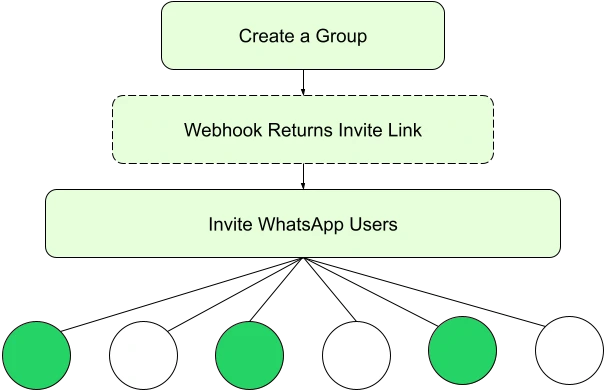
- Users Decide to Join: When a business creates a group, the system automatically generates a unique invite link containing the group’s topic and description, allowing users to make an informed choice before joining.
- No Forced Additions: Unlike consumer WhatsApp apps, businesses cannot forcibly add users to a group via API. Businesses must first send group invitations via 1:1 direct messages to encourage users to join voluntarily, which significantly protects user privacy and consent.
- Instant Webhook Triggers: Once a user joins, a Webhook notification (e.g., group_participants_update) triggers instantly. This grants the business messaging permissions for automated chat workflows within the group.
Source: Meta
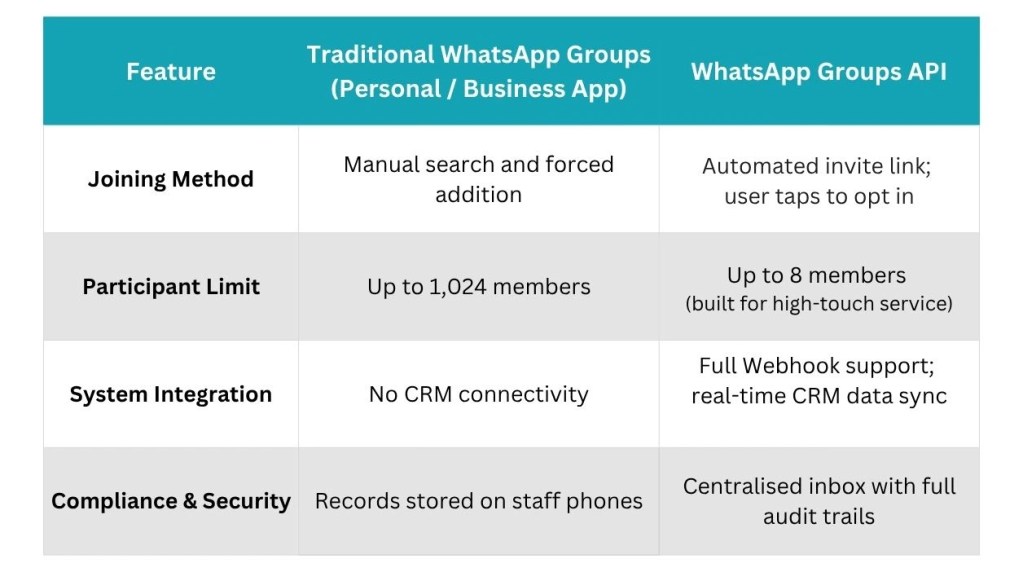
Traditional WhatsApp Groups vs. WhatsApp Groups API
Many companies previously relied on staff using personal or WhatsApp Business Apps to manage group chats manually. As operations scale, this creates significant bottlenecks and compliance risks.
Workflow & Operational Efficiency
- Traditional WhatsApp Groups: Entirely manual. Staff search for contacts, add them one by one, send files manually, and leave or delete groups when projects end. Managing dozens of clients simultaneously is error-prone and labor-intensive.
- WhatsApp Groups API: Fully automated. The API connects directly to your CRM or ticketing system. For example: Customer submits a support request on your website System creates a group and generates an invite link Link is sent automatically via 1:1 message Customer joins and triggers team assignment The group closes automatically upon resolution.
Conversation Retention & Compliance
- Traditional WhatsApp Groups: Chat records live on individual employee devices. If an employee leaves, customer histories can be lost, and businesses cannot monitor conversations for regulatory compliance.
- WhatsApp Groups API: All chats are managed centrally via the company’s messaging platform with system-level Webhook logging. This provides an auditable paper trail, ensuring complete transparency and legal compliance.
24-Hour Messaging Window & Pricing
- Traditional WhatsApp Groups: Free to use, but offers zero automation or data integration capabilities.
- WhatsApp Groups API: Every customer message refreshes the group’s 24-hour free session window, allowing the business to reply freely while open. Once the window closes, sending messages requires pre-approved Template Messages, charged per delivered recipient at regional rates.
Key Rules of the WhatsApp Groups API
To maintain conversation quality, Meta enforces clear parameters for the Groups API:
| Parameter | Official Details |
| Max Participants | Up to 8 members per group (designed for intimate, high-value coordination) |
| Max Active Groups | Up to 10,000 active groups per WhatsApp business phone number |
| Eligibility | Open to all businesses with an Official Business Account (OBA) |
| Supported Messages | Text, media (images/videos/documents), and pre-approved Templates |
| Unsupported Features | Voice/video calls, disappearing messages, view-once, interactive buttons/lists, and catalog messages |
Business Use Cases for WhatsApp Groups API
With a 8-member cap, the Groups API is optimised for high-value cases, complex services, and multi-party collaboration rather than mass marketing:
Multi-Party Case Resolution
When service flows involve multiple stakeholders, 1:1 message relaying leads to miscommunication. The Groups API automatically creates a group upon case creation, inviting the client, dedicated support, technical experts, or external vendors to a single chat room to resolve issues faster.
- Industry Example (Wedding Planning): A wedding planning agency can automatically spin up a dedicated chat group including the couple, lead planner, makeup artist, photographer, and venue manager to align on schedules, makeup trial photos, and last-minute adjustments seamlessly.
- Industry Example (Renovation): A renovation company can create a group for each project consisting of the homeowner, interior designer, project manager, and lead contractor to send site construction progress photos, confirm material samples, and resolve structural issues through immediate multi-party discussions.
Private VIP Client Service
For high-net-worth or VIP clients requiring tailored service, businesses can create dedicated group pods with client advisors, product specialists, and senior managers. This personal, context-rich environment offers premium service for high-trust, long sales cycles.
- Industry Example (Finance): Dedicated relationship managers and investment advisors can establish a 3–4 person private group with a VIP client to regularly provide portfolio recommendations and reviews, with all conversation records backed up to satisfy regulatory compliance requirements.
- Industry Example (Aesthetics): Medical aesthetic clinics can set up dedicated small groups for VIP clients booking high-end treatments, including a personal advisor, attending doctor, and post-procedure nurse, to provide pre-treatment reminders, priority appointment arrangements, and 1:1 post-care follow-ups.
Scheduled Cohort Management & Progress Tracking
For cohort-based programs or fixed-schedule services, businesses can group small client batches together. Admins can automate reminders, schedules, and checklists while allowing members to ask questions in one shared thread.
- Industry Example (Education): Tutoring centers or language academies can create a group for fixed-schedule small classes (e.g., “IELTS Saturday 10 AM Class”) containing 1 tutor and 5–6 students to automatically send class reminders, homework assignments, and practice links.
- Industry Example (Fitness): Fitness centers can create a group for 3–4 friends joining a weight loss or training program together, making it easy for coaches to send daily nutrition reminders and training checklists, allowing friends to cheer each other on while having their dedicated coach answer questions anytime.
How to Get Started & Deploy WhatsApp Groups API
To launch the WhatsApp Groups API, complete the prerequisites before following the four core setup steps:
Prerequisites
- WhatsApp Cloud API: Your phone number must be onboarded to Meta’s official Cloud API (not the WhatsApp Business App).
- Webhook Server
- Clients simply need to apply for the Cloud API, connect it to Omnichat, and enable the group messaging feature to get started.
3 Core Deployment Steps
- Step 1: Create a Group
Create a group and enter the group subject and description. Once created successfully, a dedicated invitation link will be generated for that group.
- Step 2: Send Invites & Receive Join Notifications
After obtaining the invitation link, send it to target customers via 1:1 direct message. When a customer clicks the link to join the group, the system automatically triggers a Webhook to notify the business team of their successful entry.
- Step 3: Message & Automate via Omnichat
With the user joined, send text, media, or templates directly via the Cloud API or Omnichat’s Omnichannel System. Every message or status update triggers Webhook logs for audit tracking and team collaboration.
Conclusion
The launch of the WhatsApp Groups API completes the suite of business communication tools. When designing your messaging strategy, keep these simple guidelines in mind:
- 1:1 Messaging: Best for private customer inquiries, personalised sales, and post-purchase follow-ups.
- WhatsApp Broadcast: Best for one-to-many marketing promotions, holiday greetings, and mass announcements.
- WhatsApp Groups API: Best for multi-party collaboration, VIP client management, and case follow-ups that require complete conversation records.
Flexibly combining these three messaging modes not only boosts cross-departmental collaboration but also delivers a seamless, professional service experience for your customers!
Book a Consultation