How can businesses efficiently reach potential customers? Data shows that compared to emails with an open rate of only about 20%, WhatsApp messages have an open rate of up to 98%. WhatsApp Broadcast is a golden sales channel. However, many merchants struggle with failed messages and strict recipient limits. This article compares the differences in broadcast features among the Personal version, Business version, and enterprise-grade API, teaching you how to break through limits and send bulk messages safely and compliantly!
Key Takeaways
・Difference between Broadcasts and Groups: WhatsApp Broadcast is a “one-to-many” communication with high privacy where customers receive messages in private chats. This is different from a “Group,” which is public and many-to-many.
・Personal and Business limits: Free Personal and Business broadcast lists are capped at 256 contacts. Crucially, both parties must save each other’s numbers for messages to deliver. Frequent bulk messaging also carries a high risk of account bans.
・API Broadcast advantages: Upgrading to WhatsApp Business API via Omnichat allows you to broadcast to users who haven’t saved your number. It also unlocks cloud contact storage, broadcast scheduling, personalised fields, and comprehensive data tracking.
・Official approval mechanism: When using the API to broadcast to customers with no interaction for over 24 hours, you must use pre-approved Template Messages. These templates support images, videos, CTA buttons, and personalised variables to drive conversions.
What is WhatsApp Broadcast?
WhatsApp Broadcast is a “one-to-many” instant communication tool. Merchants can create a broadcast list and send the same message to multiple contacts with a single click. Upon receiving the message, customers can reply directly to the merchant within the same chat window—unlike traditional SMS, which only supports one-way delivery without any interaction.
Many beginners confuse “Broadcast” with “Group.” They have fundamental differences in operation and privacy:
- WhatsApp Broadcast (One-to-Many): Only the merchant can see the list. When you broadcast, each customer receives it in a one-on-one private chat. It looks like a dedicated personal message, and replies are only visible to you, ensuring high privacy. While WhatsApp Business has a broadcast list limit of 256 people per send, WhatsApp Business API has no recipient limits (via automatic scaling).
- WhatsApp Group (Many-to-Many): Everyone communicates in the same chat room. Members can see each other’s phone numbers, and all conversations and replies are fully public. It is suitable for public discussions, with a group member limit of 1,024 people.
Personal WhatsApp Broadcast
If you are just starting out with a small number of contacts, you can use the free Personal WhatsApp to quickly create broadcast lists. Please note that broadcast lists can currently only be created and managed on the mobile app; the web and desktop versions do not support list creation.
Steps to Create:
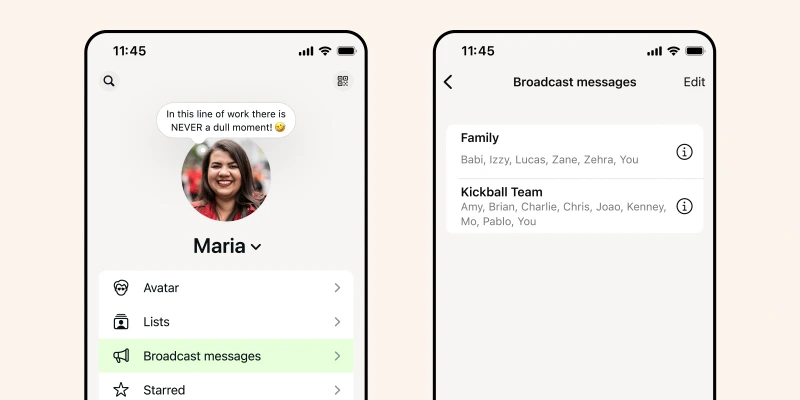
- Tap Settings > Broadcast Lists (群發訊息).
- Tap “New List” at the bottom.
- Select the contacts you want to add (at least 2, maximum 256), then tap “Create”.
- The system will automatically open a broadcast chat window. It is recommended to return to the list directory and tap the “i” icon on the right to rename the list (e.g., “VIP Members”) for easier management in the future.
Source: WhatsApp
For personal broadcasts, the recipient must have saved your phone number to receive your broadcast message. If the other party has not saved your number, your message will only display a “single tick,” and they will not receive it at all.
Pros and Limitations of WhatsApp Business Broadcast Lists
WhatsApp Business features a built-in Broadcast Lists function, allowing you to send messages to hundreds of customers at once, meeting needs such as holiday greetings or promotions for small merchants. Broadcast lists are one-way communications; only the sender can send messages, protecting recipient privacy.
WhatsApp Business Built-in Broadcast List Advantages:
- Zero-threshold free use: No subscription fees or maintenance costs. Simply download it from the App Store or Google Play to start using it immediately, making it ideal for startup brands and micro-merchants with limited budgets.
- Zero learning curve, easy to use: The interface is identical to the personal version of WhatsApp. Merchants can get started quickly without complex technical training, managing daily communication easily.
WhatsApp Business Built-in Broadcast List Limitations:
- Still restricted by the 256-person rule: Each broadcast list can hold a maximum of 256 people. Manually splitting lists when customers grow to thousands becomes a massive, repetitive workload.
- Both parties must save phone numbers: You can only send to contacts in your address book, and recipients must save you as a contact to receive your messages.
- Multi-device login limitations: Supports only 1 phone and a maximum of 4 web/desktop logins. If the primary phone is inactive for 14 days, all devices automatically log out, making multi-person customer service collaboration difficult.
- High risk of account suspension: Frequently sending identical commercial messages to a large number of customers carries a high risk of being reported as spam, which can lead to permanent account suspension.
WhatsApp Business Broadcast vs. WhatsApp Business API Broadcast
When a brand scales up and needs to send bulk messages to thousands or tens of thousands of customers without the “recipient must save number” restriction, upgrading to WhatsApp Business API is the only compliant path.
Here is a comparison of their broadcasting and marketing features:
| WhatsApp Broadcast Feature | WhatsApp Business Built-in Broadcast List | WhatsApp Business API + Omnichat |
| Contact Data Storage | Phone Address Book | Cloud Storage |
| Who Can Receive Your Broadcast? | Mutual contacts (customers must save your number) | Anyone, as long as you have their mobile number |
| Can Schedule in Advance? | No, can only send immediately | Yes, schedule to send at a specific time |
| Recipient Limit Per Broadcast | 256 people | Unlimited (via automatic scaling) |
| personalised Info in Broadcast | No, everyone receives the exact same message | Yes, can insert personalised info based on the recipient |
| Performance Metrics & Statistics | None | Delivery success rate, read rate, click rate |
How to Create WhatsApp Business API Template Messages?
To prevent spam, WhatsApp regulations require that when businesses use the API to broadcast to customers with no interaction for over 24 hours (active contact), they must use pre-approved Template Messages. The approval process is usually automated and takes about 1 to 2 business days.

A complete template message must include a template name, category, translation, and parameter settings. It supports not only text but also images, videos, interactive call-to-action (CTA) buttons, and list menus.
In practice, merchants only need to preset variable fields in the template and import customer data (such as name or exclusive promo code) with one click when sending, bypassing rigid limits to send highly converting personalised broadcasts to massive audiences!
Using WhatsApp Business API Broadcast via Omnichat
If your business is larger and you need features like scheduling broadcasts, storing contacts in the cloud, viewing performance reports, automatically inserting personalised information, or connecting to chatbot automation, you need to open and use the WhatsApp Business API through a professional management platform like Omnichat.
Cloud Contact Data Storage
Store customer data in a cloud database and select them with a simple check to broadcast. Lists can be updated at any time to target the right audience. You no longer need to store all customer data on your phone, which is troublesome and increases the risk of data loss or leakage.
No Number Saving Required to Broadcast
Once WhatsApp Business API is activated, customers do not need to save your WhatsApp number to receive your broadcast! Merchants can reach more potential customers without requiring them to save your contact.
WhatsApp Business API has become one of the most effective channels for customer relationship maintenance and remarketing. Paired with WhatsApp broadcast list features, it helps merchants manage massive contact databases and improve sending efficiency.
WhatsApp Broadcast Scheduling
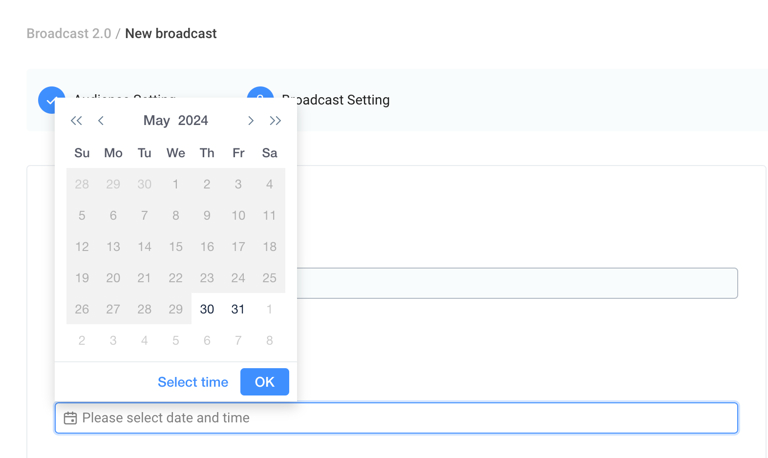
Through the Omnichat platform, you can schedule broadcasts to send messages automatically at specified times without staying glued to your computer or phone. Marketing campaigns can run on schedule, dramatically improving execution efficiency. You can also target different customer segments with tailored content using bulk messaging lists, making your marketing campaigns highly flexible and precise.
WhatsApp personalised Broadcast Messages
Make each customer receive unique content! By inserting personalised information (e.g., name, product name, order number), customers feel valued, improving engagement and click rates.
On the Omnichat platform, you can upload CSV files to send WhatsApp broadcasts, automatically inserting personalised fields based on your contact data so that every customer receives a message tailored specifically to them.
WhatsApp Broadcast Performance Statistics
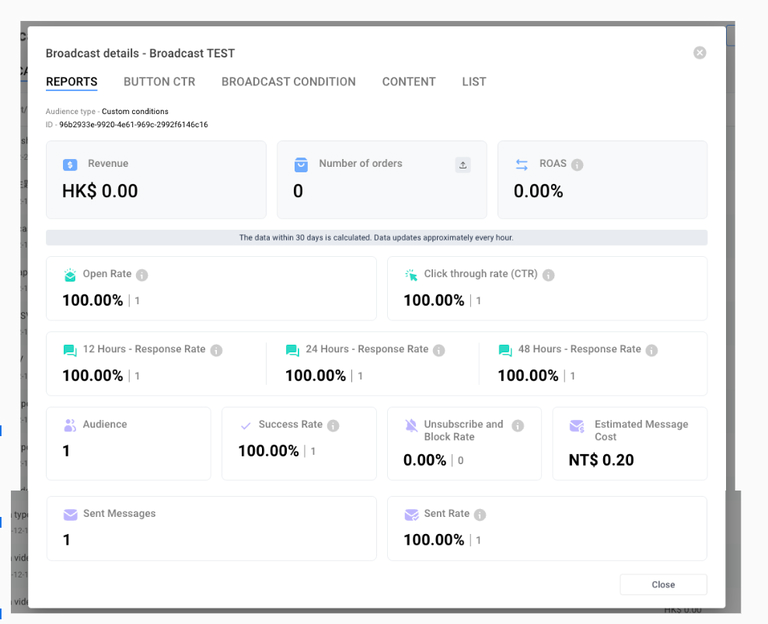
Track performance to optimise strategies. Omnichat provides comprehensive statistics, including delivery success rate, read rate, and click rate.
Beyond overall campaign reports, you can also dive deep to view individual interaction details for each contact, allowing you to capture customer behaviors in fine detail.
Book a Consultation