

WhatsApp stickers are custom static or animated visuals that make WhatsApp conversations more expressive and memorable. Users can create stickers directly within WhatsApp or use third party tools to design custom sticker packs. For brands, using WhatsApp stickers for business can do more than add personality. It can strengthen brand recall, improve engagement, and support campaigns through broadcasts, chatbots, and automated replies. In this guide, you will learn what a WhatsApp sticker is, how to create one with built in tools or the Omnichat Sticker Pack, the benefits of using WhatsApp stickers, and how to use them effectively in business conversations.
💡Key Takeaways: WhatsApp Stickers
– WhatsApp stickers are a visual communication format that helps users and businesses express messages more clearly and create more engaging conversations.
– Businesses can create custom WhatsApp sticker packs using built-in tools, third-party platforms, or solutions like Omnichat to support scalable marketing and automation.
– Branded WhatsApp stickers strengthen brand recall and can drive organic reach through user sharing, making them a low-cost and high-impact marketing asset.
– With the WhatsApp Business API, stickers can be used in broadcasts, chatbots, and keyword auto replies to enhance customer engagement and personalise interactions at scale.
– Businesses that want to automate campaigns, manage customer conversations, and deploy stickers effectively can leverage Omnichat to integrate stickers into their broader messaging and CRM workflows.
What is WhatsApp Sticker?
A WhatsApp sticker is a visual messaging format that allows users to express emotions and ideas more effectively than text alone. Stickers are widely used in personal chats and increasingly adopted by businesses to create more engaging and memorable conversations.
WhatsApp stickers are mainly divided into two types:
- Static Stickers: These are image-based, typically in PNG or WebP format, used for simple expressions or designs.
- Animated Stickers: These are based on videos or GIFs, capable of continuous motion, and are more lively and helpful for conveying complex emotions or exaggerated reactions.
WhatsApp Stickers Size and Format:
To ensure stickers display properly, WhatsApp stickers are usually designed in a square format at 512 × 512 pixels and saved as WebP files, with different file size limits for static and animated stickers.
How to Create Your Own WhatsApp Stickers
You can easily build your own exclusive sticker collection through three methods:
Method 1: The Built-in WhatsApp Feature
This is currently the most convenient way to create your own stickers. Using WhatsApp’s built-in editing tools, you can directly crop photos, remove backgrounds, add text, or even draw doodles, and save them as stickers instantly without any third-party software.
On WhatsApp Desktop: In a chat, click the “+” in the bottom left, select “New Sticker,” and choose an image from your computer. You can then edit it, adding text, emojis, and shapes.
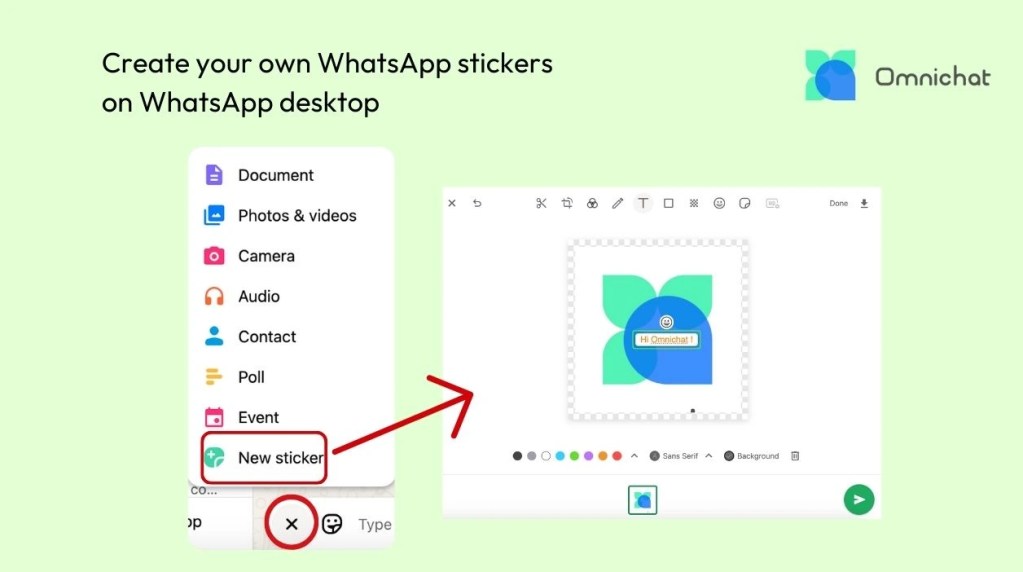
On WhatsApp Mobile App: In a chat, tap the sticker icon at the bottom, then “Create,” select a photo to turn into a sticker, add text and emojis, and tap “Send” when finished.

Method 2: Omnichat WhatsApp Sticker Pack
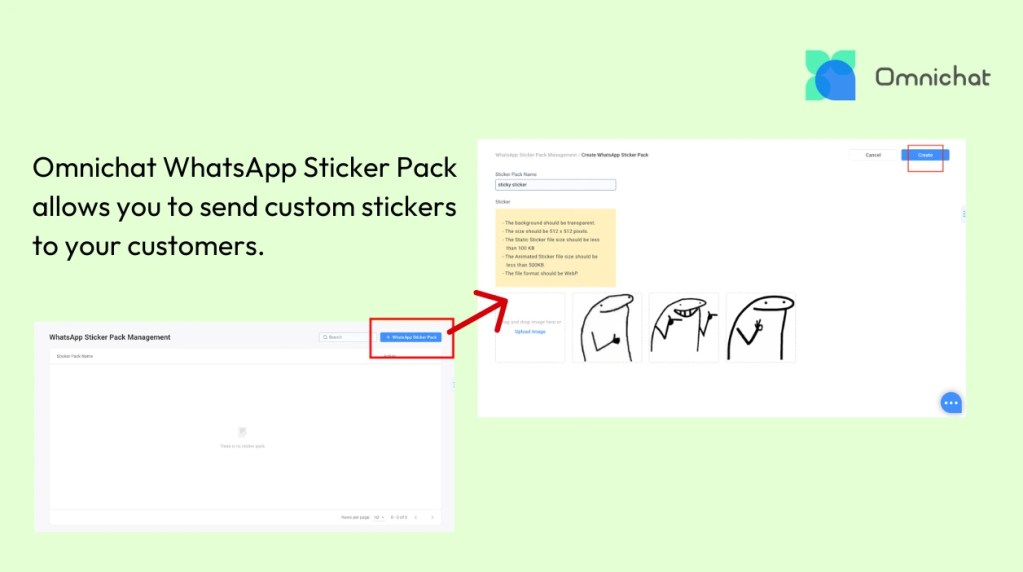
Omnichat WhatsApp Sticker Pack allows you to send custom stickers to your customers, adding personality and visual flair to your conversations. This feature requires the purchase of the Stickers add-on for your WhatsApp Business API account connected to Omnichat.
- Navigate to Advanced Automation > WhatsApp Sticker Pack.
- Click “+ WhatsApp Sticker Pack” on the top right to begin adding your sticker pack.
- Start naming your sticker pack and begin uploading the images for your sticker pack.
- Once you have uploaded all your stickers, click “Create when finished.
Method 3: Assistance from Third-Party Tools
If you want to create complex animated stickers or manage several large sticker packs, you can use specialised third-party apps, such as WhatSticker or Sticker Maker. These tools often provide more detailed editing options and format conversion functions, but once created, the stickers need to be manually imported into WhatsApp.
Benefits of WhatsApp Stickers
WhatsApp stickers are not only fun additions to conversations but also practical communication tools. They bring warmth to personal chats by helping users express emotions and personality more clearly, while giving businesses an effective way to strengthen brand connections and create more engaging customer interactions.
Enhance Emotional Expression
WhatsApp stickers are the most direct way to express emotion and personal style. A well-designed sticker can often be worth a thousand words, making conversations more human and warm. It also allows for the quick transmission of complex instructions or feelings, saving time from typing.
Strengthen Brand Impression
For businesses, designing an exclusive set of brand stickers (e.g., company mascots or slogan logos) allows the brand’s visual identity to seamlessly integrate into customers’ daily conversations. When users share these stickers, the brand gets continuous exposure in a non-intrusive way, effectively boosting brand recall and affinity.
Low Cost, High Virality
Stickers have immense viral marketing potential, transforming into a low-cost, high-impact word-of-mouth marketing model. For example, a business can design a sticker with a holiday promotion theme. When customers share these stickers with friends, they are indirectly promoting the brand. This user-initiated spread is more trusted and influential than traditional advertising, bringing a large amount of free exposure to the brand.
Business Applications of WhatsApp Sticker with WhatsApp Business API
In recent years, it has become a habit for many people to send holiday stickers on WhatsApp to express well wishes. Recognising this behaviour, many brands have created their own WhatsApp sticker packs. When combined with the WhatsApp Business API, these branded stickers can be used in broadcasts and automated messages to increase engagement and strengthen brand visibility during festive campaigns.
Sending WhatsApp Stickers through WhatsApp Broadcast
With a WhatsApp message open rate of up to 98% (compared to a typical 20% for SMS and email), sending a single WhatsApp Broadcast message to a large number of targeted customers through Omnichat makes it easier to stand out from other brands. These fun and personalised stickers have viral potential. When customers share a brand’s stickers with friends, it brings free promotion for the brand, effectively saving on additional advertising costs.
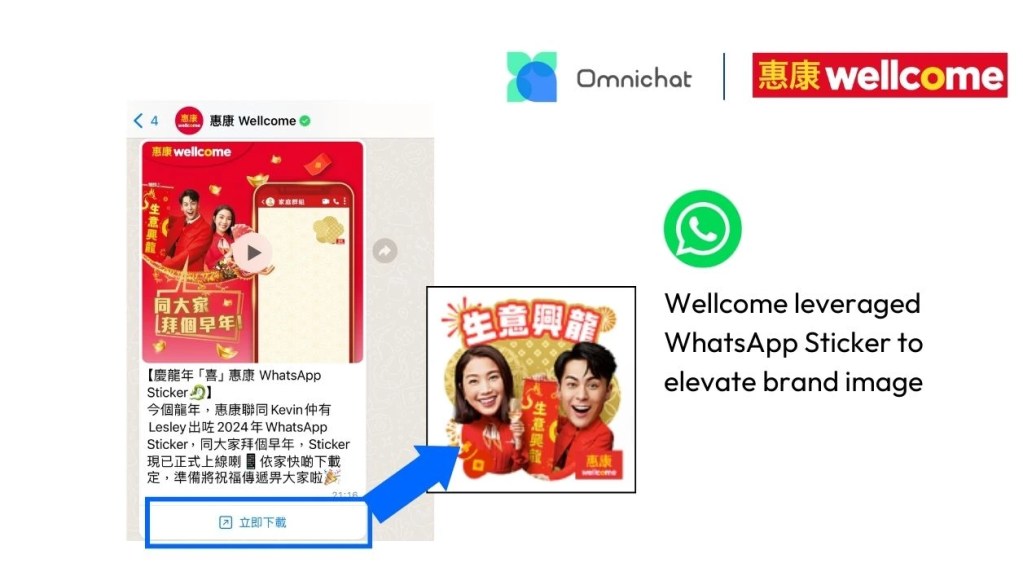
To further enhance its brand image and customer engagement, Wellcome used a WhatsApp Broadcast to send a WhatsApp Sticker to customers for an early Chinese New Year greeting. By clicking a link, customers could download the festive stickers to share with others, which in turn became free promotion for the brand.
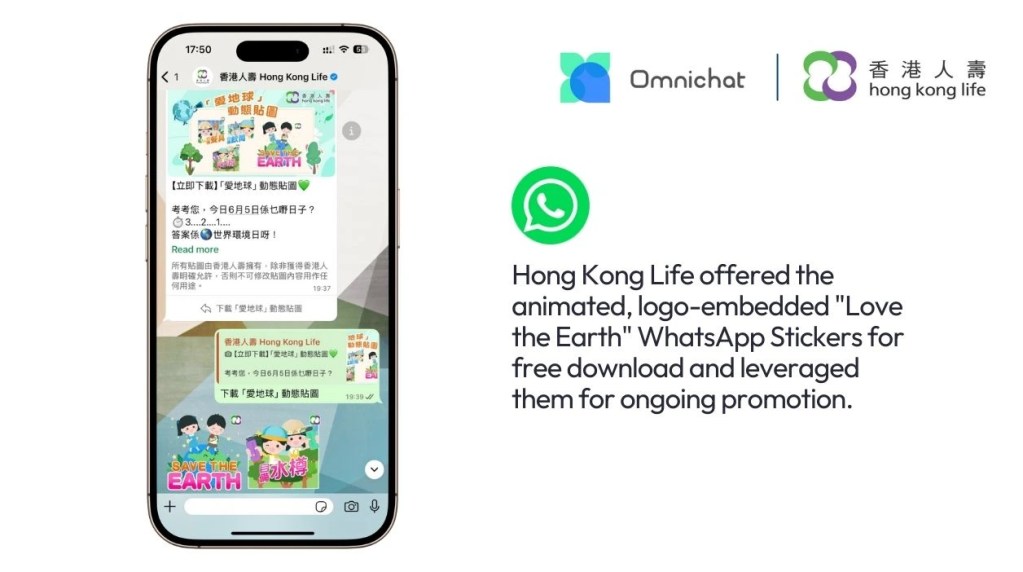
Hong Kong Life offers branded WhatsApp Stickers for free download and leverages them for ongoing promotion. They sent a WhatsApp Broadcast message for World Environment Day, allowing users to click a button and instantly download the animated, logo-embedded “Love the Earth” sticker. This strategy transforms user downloads and shares into highly valuable first-party data and contact information, effectively building a robust prospect database through viral WhatsApp interaction.
Using WhatsApp Stickers in a Chatbot
Businesses can combine a chatbot with WhatsApp stickers for a more human-like customer interaction. Businesses can pre-set stickers as part of the chatbot’s replies. For example, when a customer inquires about a product, the chatbot can send a “processing your request” or “thank you for your inquiry” sticker along with the text message, making the communication more dynamic. This innovative interaction not only deepens brand impression but also enhances the customer’s conversational experience.
Triggering WhatsApp Stickers with Keyword Auto-Reply
Businesses can also combine keyword auto-reply with WhatsApp stickers. Brands simply need to set a specific keyword as a trigger. When a customer enters that keyword, the system will automatically send a pre-set sticker as a reply, which is especially useful during holiday periods. For example, when a customer enters the name of a holiday, a festive sticker can be sent as an auto-reply. This vivid visual content deepens the brand’s impression and makes automated customer service more approachable.
Benefit Cosmetics also previously launched brand stickers for Chinese New Year. Users could simply scan a QR code or enter the keyword “CNY” to automatically receive festive stickers from Benefit. This also allowed Benefit to obtain the customer’s WhatsApp contact for future remarketing campaigns.

Book a Consultation