
The newly launched WhatsApp Flows by Meta empowers businesses to achieve deeper customer engagement throughout the entire lifecycle. With WhatsApp Forms, companies can capture event sign-ups, appointment bookings, and customer feedback instantly. This helps increase conversions, generate more leads, and improve customer satisfaction — all within WhatsApp’s built-in form system.
You may think of a WhatsApp Form as similar to Google Forms or SurveyMonkey, but it is designed specifically to support business growth. While traditional forms often exist in isolation, WhatsApp Business Forms integrate seamlessly into customers’ favourite messaging app. This allows brands to create a personalised journey from discovery and bookings to purchase, after-sales support, and ongoing re-engagement.
Ready to see the value of WhatsApp Forms in practice? In the next sections, we will explore the benefits, highlight the differences between WhatsApp Forms and Google Forms, and show how WhatsApp booking forms can help businesses drive engagement and real results.
What are WhatsApp Forms?
WhatsApp Forms, also known as WhatsApp Flows, is a native form builder for making reservations, registering events, collecting customer enquiries and feedback and whatever your businesses need without customers ever leaving WhatsApp! No more app downloads or platform switching for your customers – just a seamless, automated in-chat experience.
There’s just one thing before utilising WhatsApp Forms: this feature is exclusively available on the WhatsApp Business Platform (API). But don’t worry! You can easily unlock and maximise its potential with Omnichat, an official WhatsApp Business Solution Provider.
Key Benefits of Using WhatsApp Business Forms
The powerful feature is designed to create a seamless and personalised shopping experience that keeps your customers engaged, leading to higher conversions, happier customers, and streamlined data management.
Integrating WhatsApp Forms directly with your CRM and booking systems, complex processes are simplified into interactive flows, from scheduling appointments to capturing leads, optimising conversions and task completion.
Without switching between multiple screens, your customers can enjoy a smooth, seamless in-chat experience that naturally leads to increased satisfaction and conversions.
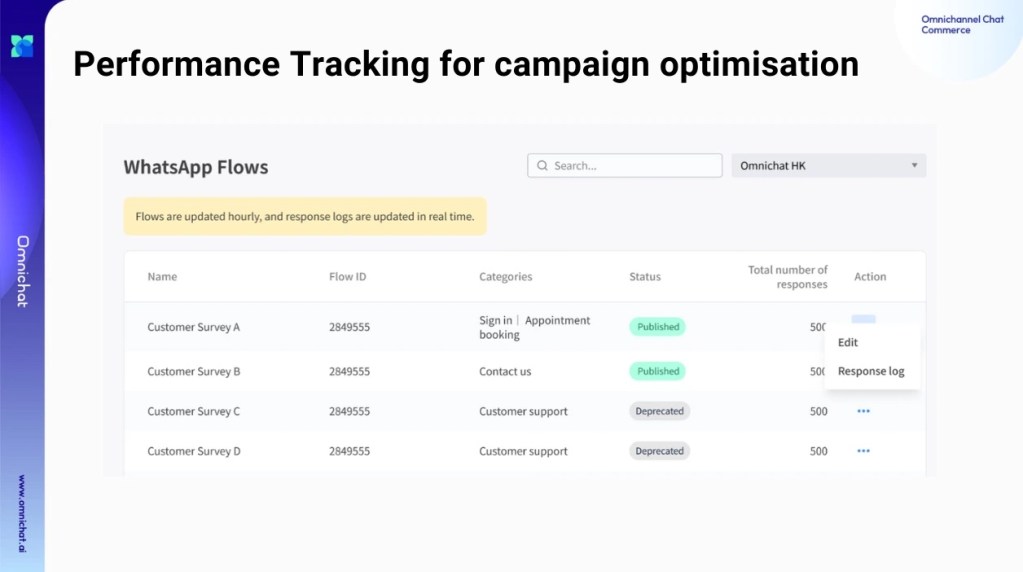
All the data and responses are collected and consolidated within Omnichat for comprehensive tracking, analysis, and campaign optimisation. With these insights, businesses can make informed decisions, fine-tune their strategies, and achieve optimal results.
WhatsApp Forms vs. Google Forms: Main Differences
Which one should you choose, WhatsApp Forms or Google Forms? We have broken down the key differences to help you choose the perfect form builder to align with your business needs!
| Features | WhatsApp Forms | Google Forms |
| Form Builder | One-stop creation and distribution on WhatsApp | Build on Google, requires sending a separate URL link via WhatsApp |
| Native Format on WhatsApp | ✅Seamless, in-app experience | ❌ Require users to open a web browser, disrupting the flow |
| Two-way Communication | ✅Support remote selling and assistance directly within WhatsApp after form submission | ❌ Customers need to switch back to WhatsApp to continue the conversations |
| Automated Chatbot | ✅Support linkage to pre-set chatbots for personalised engagement and support | ❌Lack of integrated chatbot functionality |
| Segmentation | ✅Support auto-tagging after form completion for precise segmentation and remarketing | ❌No auto-tagging for segmentation |
| Data Security & Privacy | ✅ Customers complete the form within the official Meta verified account (with blue tick) | ❌ Customers are unable to determine whether the Google form they submit is verified or official |
Here’s the beauty of it: WhatsApp Forms are built right into WhatsApp – one of Hong Kong’s most popular messaging apps. It means you can leverage all the features your customers already know and love:
Effortless Communication: Connect with your audience where they’re already engaged.
Chatbot Automation: Provide quick answers and support via automated chatbot, so as to streamline processes and free up your team’s time.
Customer Segmentation: Gather valuable data by tagging to tailor your marketing strategies for remarketing.
Picture this: you are filling out a Google Form to pre-order an item and have a quick question about shipping details. Suddenly, you are forced to switch apps, hunt for contact info, and wait for a response. Frustrating, right? And that frustration often leads to lost sales and leads.
WhatsApp Forms eliminate that friction. Customers can ask questions, get support, and complete their forms – all within a single, familiar app.
Additionally, when customers see that your WhatsApp account has the Meta Verified Badge, they know you are real and official. This added layer of trust can significantly increase their willingness to share personal information through WhatsApp Forms.
Case Studies: How Businesses Use WhatsApp Forms to Increase Engagement and Bookings
With one-stop in-chat capabilities, WhatsApp Forms have driven incredible results for businesses: Lenovo achieved 8.2x more appointment bookings, Indian healthcare platform Apollo 24/7 drove a 72% increase in average revenue per order, and Brazilian lender Consórcio Magalu witnessed a remarkable 2.9X boost in conversions.
Lower funnel drop-off rates, higher engagement, and happier customers – all thanks to a more streamlined and personalised experience brought by WhatsApp Forms. Want to learn more? Explore inspiring use cases here or connect with our expert consultants today!
Book a Consultation