Has your WhatsApp Business account been blocked unexpectedly? For many businesses in Hong Kong, WhatsApp Business is a critical channel for real-time customer communication, marketing, and sales. When your WhatsApp account is blocked or banned, it can immediately disrupt daily operations.
A WhatsApp account is usually blocked due to policy violations, spam-like behaviour, or repeated reports from other users. In WhatsApp’s ecosystem, a “banned account” means your account has been restricted or permanently disabled by WhatsApp itself, which is different from being blocked by individual contacts.
If WhatsApp identifies a policy violation, the consequences can include a temporary suspension or permanent ban. Businesses may also lose access to their chat history and backups until the account is restored or unbanned. While some users ask whether WhatsApp automatically unblocks business accounts, in most cases manual action is required to request a review and restore access. To reduce the risk of being blocked, it’s essential to follow WhatsApp’s policies carefully. Adjusting your privacy settings, such as who can see your last seen status, online status, and status updates, can also help maintain compliance with platform rules.
As an official WhatsApp Business Solution Provider, Omnichat helps businesses send messages at scale while staying compliant with WhatsApp policies, reducing the risk of bans caused by improper usage. In this guide, we’ll explain the most common reasons why WhatsApp Business accounts get blocked or banned, what you can do to recover your account, and how to prevent future issues.
Why is Your WhatsApp Business Account Blocked or Banned?(Common Reasons Explained)

There are several ways a WhatsApp Business account may be blocked, such as violating platform policies, misusing messaging features, or engaging in behaviour that WhatsApp considers suspicious. These actions often trigger automated or manual reviews that can result in account restrictions.
If your account is reported by users, WhatsApp may initiate a review, which can lead to temporary restrictions or even a permanent ban. For example, sending unsolicited messages to broadcast lists or adding users to groups without their consent significantly increases the risk of your WhatsApp being blocked. Reports are more likely when recipients do not recognise your business or did not agree to receive the following message.
When you send unsolicited messages to a group or broadcast list, you increase the likelihood of being flagged. You cannot add users to a group without their consent, even if it appears to be a normal group created for announcements or promotions. Doing so may violate WhatsApp’s policies and result in penalties or account suspension.
You must ensure that proper consent has been obtained before messaging users. Activities such as spamming, sharing sensitive information, or sending unwanted promotional content can lead to account blocks. To understand what actions may result in a ban, businesses should regularly review the latest WhatsApp policies. If a user reports your account because they feel their privacy has been violated, blocking can occur quickly.
Maintaining good relationships with contacts is also important to avoid being blocked. Following normal group and messaging etiquette, such as respecting privacy and sending relevant content only to opted-in users, helps reduce complaints. Always obtain explicit consent before adding users to a group, as adding contacts without permission can result in account restrictions or loss of access.
Blocked or Reported by too Many WhatsApp Users
WhatsApp actively monitors user activity to prevent spam, abuse, and harassment. A person might block you on WhatsApp for personal reasons, such as conflict, needing space, or feeling that your messages are pushy or unwanted. If your WhatsApp Business account is repeatedly reported or blocked by a large number of users, it may be flagged for violating WhatsApp’s policies. In such cases, WhatsApp can suspend, restrict, or permanently disable the account without prior warning.
This is one of the most common reasons for getting your WhatsApp Business account blocked, especially if users perceive your messages as intrusive, irrelevant, or unsolicited. If you can no longer see a person’s posts, status updates, or profile photo, it may indicate you have been blocked.
Sending Mass or Bulk WhatsApp Messages too Frequently
Sending unsolicited promotional or repetitive messages, especially through bulk messaging tools or broadcast lists, can significantly increase the risk of your WhatsApp Business account being blocked or banned. If a large volume of messages is sent within a short timeframe, WhatsApp’s systems may flag the activity as spam-like or automated, which can result in an immediate suspension or account block. If your messages do not connect or are not delivered, this may also indicate that the recipient has blocked you.
To avoid having your WhatsApp blocked, always use consent-based messaging and ensure that recipients have opted in to receive your communications.
Violating WhatsApp Business Policies or Terms of Service
Engaging in activities that breach WhatsApp’s Terms of Service or Business Policy can result in your WhatsApp Business account being blocked or banned. The WhatsApp Business app, which is designed for small businesses, has more restrictions than the WhatsApp Business API, and violating its terms can quickly lead to account bans. Common violations include using unauthorised automation tools, scraping user data, or messaging individuals who have not opted in. In such cases, WhatsApp may suspend or permanently ban your account without prior notice.
Even if your account is later reactivated, repeated violations may lead to more severe consequences, such as a permanent account block. That is why it is essential to understand and strictly follow the official WhatsApp Business policies to avoid repeat offences. Many users ask, “Why is my WhatsApp Business account banned, and how can I unblock it?” In the next section, we will explain how to unblock a WhatsApp Business account and what steps to take if your WhatsApp is blocked.
Tips to Unblock a WhatsApp Business Account
If you’re wondering how to unblock your WhatsApp Business account, there are specific steps you can follow to resolve the issue.
When you have a banned account, you’ll typically see this message when attempting to log in:
“Your phone number has been banned from using WhatsApp. Contact support for help.”
This message indicates that your WhatsApp Business account has been blocked, either temporarily or permanently, due to a potential violation of WhatsApp’s Business Policy or Terms of Service.
To start the recovery process, open WhatsApp to check for the ban notification or, if you have reinstalled the app, to receive a verification code. If you believe the ban was issued in error, you can submit an appeal directly through the app or contact WhatsApp Support. Following the correct recovery procedure may help restore access to your account and minimise disruptions to your business operations.
How to Request a Review and Appeal WhatsApp Ban
If you believe your WhatsApp Business account was banned in error and did not violate any policies, you should request a review as soon as possible. You can do this via:
- The in-app support option on WhatsApp Business
- Or by emailing smb_web@support.whatsapp.com
When submitting your appeal, be sure to include:
- Your registered phone number
- A brief explanation of the issue
- A statement confirming compliance with WhatsApp’s policies
- A note explaining how your business depends on WhatsApp for communication
Once submitted, wait for WhatsApp’s response. While there’s no guaranteed timeline, most users receive a decision within a few business days.
Register a new WhatsApp Business Account
If your appeal is unsuccessful or if you urgently need to resume operations, you may consider registering a new WhatsApp Business account using a different phone number.
However, this approach carries certain risks. From a customer’s perspective, messages from a new or unrecognised number may appear suspicious, increasing the likelihood of being reported and potentially causing your new WhatsApp Business account to be blocked or banned. To avoid repeated issues, always ensure your messaging practices comply with WhatsApp’s Commerce Policy and Business Terms.
Use WhatsApp Business API to Avoid Future Blocks
Many merchants face their WhatsApp Business accounts being blocked due to improper use of features like broadcast messaging. To reduce this risk, upgrading to the WhatsApp Business API – also known as the WhatsApp Business Platform – is highly recommended.
This official solution allows businesses to send promotional or bulk messages in full compliance with WhatsApp’s policies, using message templates reviewed and approved by Meta. In 2025, WhatsApp introduced the blue tick verification badge (formerly green tick) for verified business accounts. Earning this badge boosts brand credibility, lowers the risk of bans, and helps build trust with customers by confirming the authenticity of your business identity.

As an official WhatsApp Business Solution Provider, Omnichat offers a mass messaging service that includes customer segmentation, predefined broadcast scheduling, and detailed performance reports. These features help you analyse key marketing metrics like open rates and click-through rates, enabling you to adjust campaigns in real time. Equally important is the proper backup and management of customer data to maintain business continuity in case your WhatsApp Business account is blocked or suspended.
Omnichat also provides automation tools such as keyword-triggered replies and chatbots, which help businesses automatically respond to frequently asked customer inquiries. For more complex requests, these tools can seamlessly escalate conversations to live customer service representatives—enhancing efficiency while reducing human workload.
By adopting the WhatsApp Business API, your business can integrate with online store platforms and CRM systems, while unlocking advanced features that boost engagement and conversions. As an official WhatsApp solution provider, Omnichat enables businesses to send WhatsApp coupons and launch interactive games directly within WhatsApp, helping you deliver personalised experiences and increase sales.
This official API solution significantly reduces the likelihood of your WhatsApp Business account being banned, and eliminates the need to worry about how to unblock a WhatsApp Business account due to policy violations.
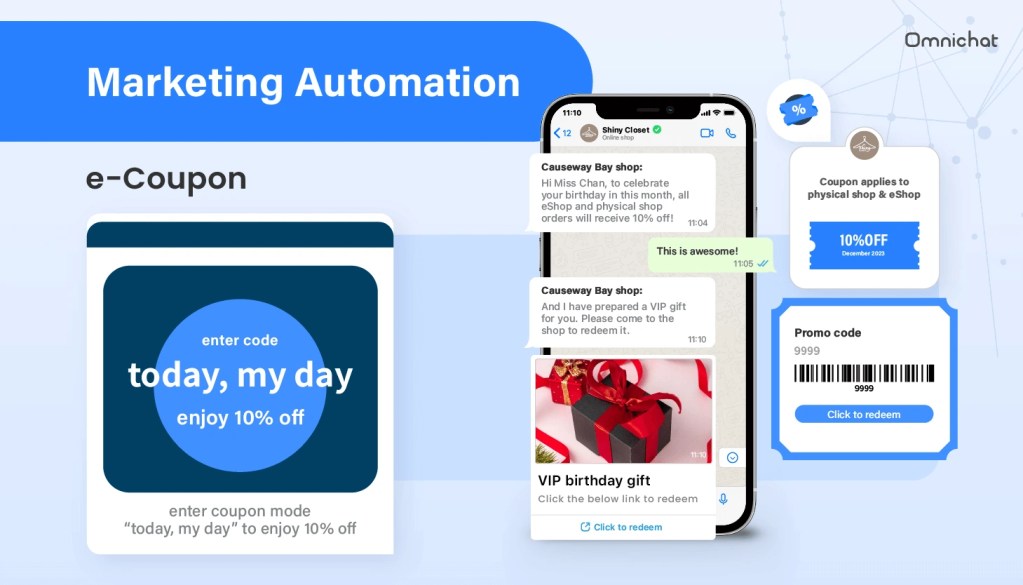
ByBy implementing a structured WhatsApp marketing strategy through Omnichat – an official WhatsApp Business Solution Provider – your business can unlock a variety of advanced features designed to reduce the risk of your WhatsApp Business account being blocked while enhancing customer engagement:
- A centralised platform for managing all customer conversations across WhatsApp, Facebook, Instagram, Live Chat, and more—enabling your team to collaborate efficiently
- 24/7 chatbot automation to streamline workflows, reduce manual workload, and improve response times
- Omnichannel coupons that can be used online and offline, supporting integrated promotional campaigns
- WhatsApp Catalog and in-chat payments, creating a seamless one-stop shopping experience with product listings, images, pricing, and direct checkout
- Social CRM for customer segmentation, enabling precise targeting and remarketing across all stages of the customer journey
- Online-merge-Offline (OMO) sales capabilities, allowing you to track and drive personalised in-store and online engagement
- Seamless automation across multiple messaging platforms, delivering a consistent and high-quality customer experience
By using these features via the WhatsApp Business API, you not only lower the risk of your WhatsApp Business account being banned, but also improve conversion rates by transforming customer conversations into measurable business results. To stay compliant and avoid unexpected disruptions – such as getting your WhatsApp Business account blocked – we recommend staying informed about WhatsApp’s latest policies, product updates, and best practices. Regularly reviewing WhatsApp’s Business Policy will also help ensure you don’t encounter issues that leave you wondering how to unblock your WhatsApp Business account.
Book a Consultation