

Has your WhatsApp Business account been banned or blocked unexpectedly? A WhatsApp Business account is usually banned because of policy violations, spam-like behaviour, bulk or automated messaging, use of unofficial apps, or data scraping. In this guide, “blocked” refers to an account-level restriction imposed by WhatsApp, not a customer blocking an individual chat.
For many businesses in Hong Kong and across Asia-Pacific, WhatsApp Business is a critical channel for customer service, marketing and sales. When an account is restricted or banned, customer conversations may be interrupted immediately, affecting response times, campaigns and revenue opportunities.
The recovery process depends on whether you use the WhatsApp Business app or the WhatsApp Business Platform. App users can select Request a review when the option is available, while Platform users should review the policy violation and submit an appeal through the relevant Meta business support tools. If the option to request a review is not available, WhatsApp states that the ban may be final.
As an official WhatsApp Business Solution Provider, Omnichat helps businesses adopt the WhatsApp Business Platform and build more structured, consent-based messaging processes. This guide explains why WhatsApp Business accounts are banned, how to appeal and attempt to recover a restricted account, and how to reduce the risk of future restrictions.
Key Takeaways
1. A WhatsApp Business account may be banned or blocked because of repeated user reports, unsolicited bulk messages, missing customer opt-in, policy violations, unofficial apps, unauthorised automation or data scraping.
2. Creating a new account should not be used to bypass a permanent ban. Businesses should first correct the underlying policy or messaging issue.
3. The recovery process depends on the product used. WhatsApp Business app users can select Request a review when available, while WhatsApp Business Platform users should appeal through Meta Business Support Home or WhatsApp Manager.
4. There is no guaranteed way to unban WhatsApp quickly. Businesses should stop potentially non-compliant activity, submit one clear appeal with accurate account information and use the official in-app, website contact form or Meta support channels.
5. The WhatsApp Business Platform and Omnichat support more structured messaging through customer opt-in, audience segmentation, approved templates, campaign monitoring and authorised automation. These tools can reduce the risk of restrictions, but they cannot guarantee that an account will never be banned.
Why Is Your WhatsApp Business Account Banned or Blocked? Common Reasons Explained

There are several ways a WhatsApp Business account may be blocked, such as violating platform policies,A WhatsApp Business account may be restricted, suspended or permanently banned when WhatsApp detects activity that violates its terms, policies or messaging guidelines. Common causes include repeated user reports, unsolicited bulk messages, unauthorised messaging tools, data scraping and contacting people without clear opt-in permission.
It is important to distinguish between two situations:
- A customer blocks your business: That individual no longer wishes to receive messages or calls from your number.
- WhatsApp restricts or bans your account: WhatsApp applies an account-level enforcement action that may limit or remove access to its Business Services.
A single customer blocking your business is not the same as WhatsApp banning the account. However, significant negative feedback, including repeated blocks and reports, may affect account quality and lead to messaging limits or other enforcement actions. WhatsApp may use automated systems and human review teams to assess reported messages and potential policy violations.
The most common reasons for a WhatsApp Business banned or blocked account are explained below.
Blocked or Reported by Too Many WhatsApp Users
WhatsApp allows users to block or report businesses whose messages they consider irrelevant, unexpected or unwanted. If a WhatsApp Business account receives significant negative feedback, WhatsApp may limit the number of messages it can send or remove its access to WhatsApp Business Services.
Businesses are more likely to be blocked or reported when they:
- Contact people who do not recognise the business
- Send promotions without prior permission
- Continue messaging after a customer has opted out
- Send irrelevant or repetitive content
- Use misleading sender information or impersonate another organisation
- Make it difficult for recipients to stop receiving messages
Cold outreach to purchased, scraped or outdated contact lists creates a particularly poor user experience because recipients may not expect the communication or understand how the business obtained their details.
To reduce complaints, clearly identify your business, explain why the recipient is receiving the message and provide an easy way to opt out. WhatsApp requires businesses to respect requests from people who want to block, discontinue or otherwise stop receiving communications.
Sending Unsolicited Mass or Bulk WhatsApp Messages
Sending a large number of messages is not automatically prohibited when businesses use authorised WhatsApp tools and follow the applicable messaging requirements. The greater risk comes from sending messages at scale in an unauthorised manner or contacting recipients who have not agreed to receive them.
WhatsApp’s policies prohibit unauthorised bulk messaging, repeated unwanted contact, harmful automation and spam-like behaviour. Businesses may therefore face restrictions if they send repetitive promotions to large contact lists without consent or generate sustained negative feedback from recipients.
Common high-risk practices include:
- Sending the same promotion repeatedly within a short period
- Messaging purchased or scraped contact lists
- Contacting recipients without clear opt-in permission
- Using unofficial bulk-sending software
- Continuing to message users after they opt out
- Sending content that differs from what users originally agreed to receive
Message relevance and quality matter as much as volume. Even legitimate businesses can generate complaints if their campaigns are too frequent, poorly targeted or unrelated to the recipient’s expectations.
For compliant messaging at scale, businesses should use authorised WhatsApp Business tools, maintain clear consent records and segment recipients according to their interests and opt-in preferences.
Violating WhatsApp Business Policies or Terms of Service
Both the WhatsApp Business app and WhatsApp Business Platform are governed by the WhatsApp Business Messaging Policy, WhatsApp Messaging Guidelines and applicable Business Terms. If a business’s content or activity violates these requirements, WhatsApp may limit or remove access to its Business Services.
Examples of potential policy violations include:
- Impersonating or misrepresenting another business
- Sending fraudulent, misleading or deceptive messages
- Contacting people without permission
- Failing to respect opt-out requests
- Using WhatsApp for illegal activities
- Promoting prohibited or restricted goods and services
- Sharing certain sensitive personal or financial information
- Using unauthorised tools to bypass WhatsApp’s messaging rules
Businesses that use catalogues, payments or other commerce features must also comply with the applicable commerce requirements. Some regulated products and services are prohibited, while others may only be promoted through the WhatsApp Business Platform in permitted countries and under specific conditions.
Businesses should review the latest WhatsApp’s official policies regularly because requirements may change. Correcting the underlying violation is also essential before submitting a WhatsApp ban appeal, since repeated or serious violations may lead to further restrictions.
Using Unofficial Apps, Unauthorised Automation or Data Scraping
Using modified WhatsApp applications, unauthorised third-party tools or scripts that collect user information can lead to a temporary or permanent account ban. WhatsApp specifically identifies unofficial applications and scraping as potential reasons for temporary bans.
High-risk tools and activities include:
- Modified or unofficial versions of WhatsApp
- Browser extensions that scrape phone numbers or customer data
- Software that automatically creates accounts
- Unauthorised bulk-message senders
- Automation designed to bypass messaging limits
- Tools that collect user information without permission
Approved automation through the WhatsApp Business Platform is different. Businesses may use authorised chatbots and automated responses, but they must still comply with WhatsApp policies and provide clear routes for customers to reach human support when required.
Businesses should therefore verify that their messaging provider uses authorised WhatsApp infrastructure rather than choosing tools solely because they promise unlimited or unrestricted messaging.
Sending Messages Without Clear Customer Opt-In
WhatsApp requires businesses to have the recipient’s mobile number and opt-in permission before contacting them through WhatsApp. The opt-in should clearly explain that the person agrees to receive subsequent messages or calls from the business.
A strong opt-in process should:
- Identify the business collecting consent
- Explain the types of messages the user will receive
- Set expectations about message frequency
- Separate consent for different message categories where appropriate
- Explain how recipients can opt out
- Record when and how permission was obtained
For example, a customer who agrees to receive delivery updates may not reasonably expect frequent promotional campaigns. Obtaining separate consent for order notifications, offers and product recommendations can reduce confusion and lower the risk of users blocking or reporting the business.
Businesses must also honour opt-out requests made either inside or outside WhatsApp. Continuing to contact someone after they withdraw permission can generate complaints and may contribute to account-quality issues or enforcement actions.
By using transparent consent processes, relevant audience segmentation and authorised messaging tools, businesses can reduce the risk of having a WhatsApp Business account banned or blocked while building more trustworthy customer relationships.
How to Recover a Banned or Blocked WhatsApp Business Account?
If your WhatsApp Business account has been banned, blocked or restricted, the recovery process depends on the type of enforcement action and whether you use the WhatsApp Business app or the WhatsApp Business Platform.
When a WhatsApp Business app account is banned, you may see a message such as:
“This phone number can’t use WhatsApp: [phone number].”
This means WhatsApp has restricted the account after detecting activity that may violate its Terms of Service, Business Messaging Policy or Messaging Guidelines. The restriction may be temporary or permanent. If the Request a review option appears in the app, you can submit an appeal directly to WhatsApp.
There is no guaranteed way to unban WhatsApp quickly. The recommended approach is to identify the restriction, stop any potentially non-compliant activity and use the official review channel provided by WhatsApp or Meta.
Check Whether the Account Is Restricted, Under Review or Permanently Banned
Before submitting an appeal, check the exact notice shown in the WhatsApp Business app, WhatsApp Manager or Meta Business Support Home.
The account may be:
- Restricted: Certain messaging functions or business features have been limited.
- Temporarily banned: WhatsApp has temporarily suspended access, sometimes because of unofficial apps, scraping or other prohibited activity.
- Under review: WhatsApp or Meta has received your appeal and is assessing the account.
- Banned: The phone number can no longer use the WhatsApp Business app.
- Permanently banned: No further review option is available.
For the WhatsApp Business app, open the app and follow the instructions displayed in the ban notification. If you use the WhatsApp Business Platform, check the violation details in Meta Business Support Home or the relevant business-management interface.
If the account uses unofficial software, unauthorised bulk-sending tools or scraping technology, stop using those tools before requesting a review. Continuing the same activity may weaken the appeal and lead to further enforcement.
How to Request a Review and Appeal a WhatsApp Ban?
If you believe your WhatsApp Business account was banned incorrectly, use the official review process.
For the WhatsApp Business app
- Open the WhatsApp Business app.
- Select Request a review when the option appears.
- Add relevant information explaining why the account should be reviewed.
- Submit the request and check the app for updates.
If the Request a review option is not available, WhatsApp states that the ban is final and cannot be appealed through the app.
For the WhatsApp Business Platform
- Open Meta Business Support Home.
- Select the restricted WhatsApp Business account.
- Review the policy violation and affected business asset.
- Select Request review when the option is available.
- Explain why the restriction may be incorrect or describe the corrective action already taken.
Businesses using the WhatsApp Business Platform should follow the appeal process provided through Meta rather than relying on general WhatsApp Support.
Include the following information when submitting a WhatsApp ban appeal:
- The registered phone number, including the country code
- Your business name and relevant business account details
- The exact restriction or ban message
- The approximate date when the restriction started
- A concise explanation of the situation
- Any action taken to correct possible policy issues
- Screenshots or documents, if requested
Avoid sending repeated or conflicting appeals. Provide one clear explanation based on accurate business and account information.
What Does “WhatsApp Account in Review” Mean?
A WhatsApp account in review means WhatsApp or Meta has received your appeal and is assessing whether the account restriction should remain or be reversed. The review may consider your account history, messaging activity, user reports and compliance with WhatsApp policies and the applicable WhatsApp Business Terms.
While your account is under review:
- Check the review status through the WhatsApp Business app or Meta Business Support Home.
- Avoid submitting multiple appeals for the same restriction.
- Do not use unofficial tools or create additional accounts to bypass the review.
- Review recent campaigns, customer opt-in records and user complaints.
- Check whether you sent too many messages within a short period or contacted people who had not agreed to receive them.
- Pause any potentially non-compliant activity before messaging customers again.
- Prepare accurate account data, including your registered phone number, business name and details of the affected account.
Submitting an appeal does not guarantee that the account will be restored. The outcome depends on the available evidence, the account’s previous activity and the nature of the suspected violation. Serious or repeated violations may result in longer restrictions or permanent loss of access to WhatsApp Business Services. WhatsApp states that only WhatsApp can ban or restore an account using the WhatsApp Business app.
How to Contact WhatsApp Support for a Banned Number?
The correct support route depends on whether you use the WhatsApp Business app or the WhatsApp Business Platform.
WhatsApp Business App Users
You can contact WhatsApp Support through the app:
- Open the WhatsApp Business app.
- Go to Settings.
- Select Help.
- Select Contact Us.
- Describe the restriction and provide the requested account information.
You can also use WhatsApp’s official website contact form when in-app support is unavailable. WhatsApp currently states that support requests should be submitted through in-app chat or its website contact form.
When contacting support, include:
- Your registered phone number with the country code
- Your business name
- The exact ban or restriction message
- The date the issue began
- Relevant account data or screenshots
- A concise explanation of why you believe the restriction should be reviewed
- Any corrective actions already taken
Can You Email WhatsApp Support for a Banned Number?
If you are searching for how to email WhatsApp Support, note that WhatsApp no longer accepts support requests sent directly to its previous support email addresses. Requests sent to support@support.whatsapp.com, support@whatsapp.com or other WhatsApp email addresses will not be processed. Use the in-app support function or official contact form instead.
WhatsApp also advises that genuine emails sent by its support team use addresses ending in @support.whatsapp.com. However, receiving a message from this domain does not guarantee that an appeal will be approved, and users should still avoid sharing passwords, verification codes or financial details.
WhatsApp Business Platform Users
Businesses using the WhatsApp Business Platform should review and appeal enforcement actions through:
- Meta Business Support Home
- WhatsApp Manager or the relevant Meta business-management interface
- Their authorised WhatsApp Solution Provider, where applicable
General WhatsApp Support does not handle account bans or restrictions affecting the WhatsApp Business Platform. Platform users should therefore follow the review process shown in their Meta business account rather than contacting standard WhatsApp app support.
Register a new WhatsApp Business Account
If your appeal is unsuccessful or if you urgently need to resume operations, you may consider registering a new WhatsApp Business account using a different phone number.
However, this approach carries certain risks. From a customer’s perspective, messages from a new or unrecognised number may appear suspicious, increasing the likelihood of being reported and potentially causing your new WhatsApp Business account to be blocked or banned. To avoid repeated issues, always ensure your messaging practices comply with WhatsApp’s Commerce Policy and Business Terms.
Use the WhatsApp Business Platform (WhatsApp Business API) to Reduce the Risk of Restrictions
Many merchants face their WhatsApp Business accounts being blocked due to improper use of features like broadcast messaging. To reduce this risk, upgrading to the WhatsApp Business API – also known as the WhatsApp Business Platform – is highly recommended.
This official solution allows businesses to send promotional or bulk messages in full compliance with WhatsApp’s policies, using message templates reviewed and approved by Meta. In 2025, WhatsApp introduced the blue tick verification badge (formerly green tick) for verified business accounts. Earning this badge boosts brand credibility, lowers the risk of bans, and helps build trust with customers by confirming the authenticity of your business identity.

How the WhatsApp Business Platform Supports Compliant Messaging
The WhatsApp Business Platform allows businesses to:
- Use Meta-approved message templates where required
- Obtain and manage customer opt-in before messaging
- Segment audiences and send more relevant campaigns
- Monitor message-template quality and customer feedback
- Review phone-number status and messaging limits
- Use authorised automation instead of unofficial bulk-sending tools
- Respect customer opt-out requests through structured workflows
Approved templates do not provide automatic protection from restrictions. WhatsApp evaluates factors such as customer feedback, blocks, reports and template quality, and it may limit businesses with consistently poor message quality.
Businesses should therefore avoid sending too many irrelevant or repetitive messages, even when using approved templates. Personalisation, audience segmentation and appropriate campaign frequency can help improve relevance and reduce the likelihood of customers blocking or reporting the business.
How Omnichat Supports Compliant WhatsApp Messaging
As an official WhatsApp Business Solution Provider, Omnichat helps businesses manage messaging through the WhatsApp Business Platform, also known as the WhatsApp Business API. Its tools support audience segmentation, scheduled broadcasts, message templates and campaign reporting, giving businesses greater control over who receives messages, when campaigns are sent and how they perform.
Omnichat’s WhatsApp broadcast solution includes:
- Audience filtering based on customer tags, purchase history and engagement
- Scheduled broadcast messages
- Flexible message templates
- Automated customer tagging and segmentation
- Reports covering message delivery, opens, clicks and conversions
- Keyword-triggered replies and chatbot automation
- Assignment of complex enquiries to customer service or sales teams
These features help businesses send more relevant messages and manage campaigns in a structured way. However, using Omnichat or the WhatsApp Business Platform does not guarantee that an account will never be restricted. Businesses must still obtain customer opt-in, respect opt-out requests and follow WhatsApp’s Business Messaging Policy.
Omnichat also brings customer conversations from WhatsApp, Facebook Messenger, Instagram, LINE, WeChat and website live chat into one shared inbox. This allows customer service, marketing and sales teams to work together while keeping customer information and conversation records within one platform.
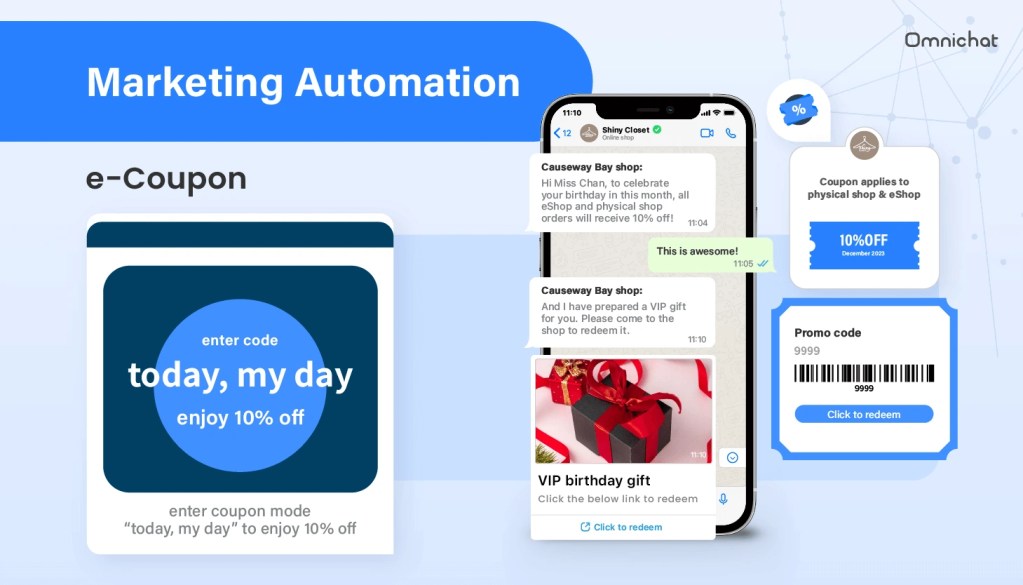
By implementing a structured WhatsApp marketing strategy through Omnichat, businesses can access a range of features that support customer engagement and more controlled messaging:
- A centralised platform for managing conversations across WhatsApp, Facebook Messenger, Instagram, LINE, WeChat and website live chat
- 24/7 chatbot automation to streamline workflows, reduce manual work and improve response times
- Interactive games and campaigns delivered through WhatsApp
- Omnichannel coupons that customers can use online and offline
- WhatsApp Catalog and in-chat payment features, where available
- Social CRM tools for customer segmentation, targeting and remarketing
- Online-Merge-Offline, or OMO, sales capabilities for connecting in-store and online engagement
- Automation across multiple messaging channels to provide a more consistent customer experience
Although the WhatsApp Business Platform cannot guarantee that an account will never be restricted, it gives businesses a more structured and authorised way to manage customer consent, message templates, audience segmentation and campaign performance.
By combining the Platform with responsible messaging practices, clear opt-in processes and regular quality monitoring, businesses can reduce the risk of their WhatsApp Business account being blocked while improving the relevance and performance of customer communications. With Omnichat, businesses can manage these processes through one centralised solution and build a more scalable and compliant WhatsApp messaging strategy.
Book a Consultation