


WhatsApp Shopify Integration (2026): Boost Sales and Customer Engagement with Omnichat

WhatsApp Shopify integration powered by Omnichat for sales and customer engagement

Losing customers before checkout is one of the biggest challenges in eCommerce. Every extra click, redirect, or delay increases the risk of drop-off. WhatsApp Shopify integration removes that friction by keeping conversations, support, and purchase intent within one familiar messaging environment.

Integrating WhatsApp with your Shopify store can be done through third-party apps, official Meta tools, or custom code. The fastest setup is typically a Shopify App Store installation, while Meta’s official options are often focused on transactional updates such as order confirmations and shipping notifications. For brands that want WhatsApp to support customer service, abandoned cart recovery, and automation at scale, choosing an integration that also supports routing and cross-channel conversation management becomes essential.

💡 Key Takeaways: WhatsApp Shopify integration
WhatsApp Shopify integration connects Shopify with WhatsApp Business for chat, notifications, and sales.
WhatsApp chat in Shopify supports real-time help, order updates, and abandoned cart recovery.
Shopify WhatsApp Business integrations enable opt-in marketing, behavioural targeting, and customer segmentation.
Omnichat Shopify integration centralises WhatsApp, social messaging, and website chat in one inbox.
Omnichat automation and routing improve conversions, reduce workload, and support loyalty through WhatsApp Business API.

For Shopify merchants, WhatsApp Shopify integration is more than adding a chat button. It becomes a scalable conversation commerce channel that supports customer support, marketing automation, and revenue generation within WhatsApp Business.

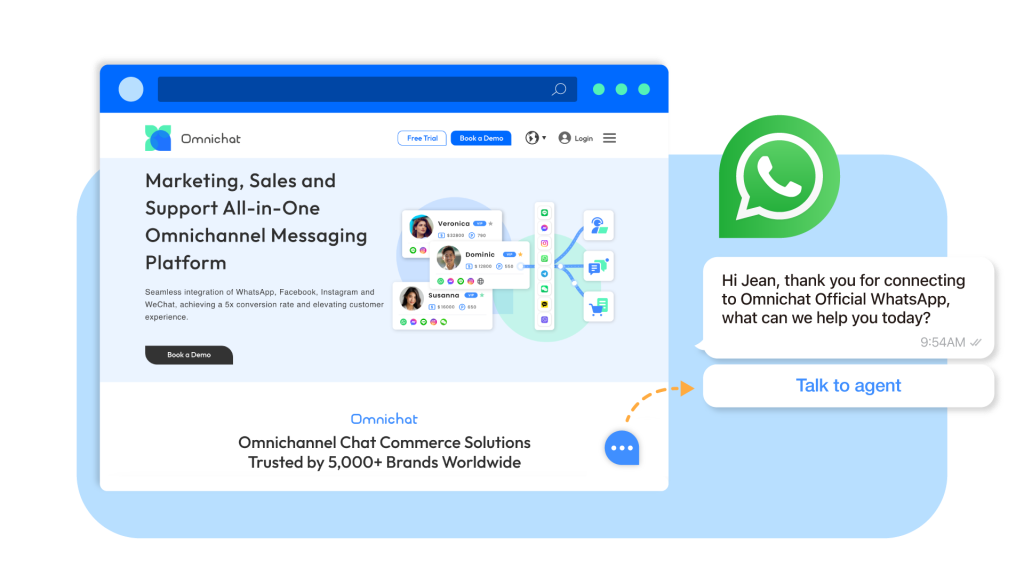
Omnichat provides a comprehensive WhatsApp Shopify integration that centralizes WhatsApp chat for Shopify, social messaging, and website conversations into one platform. Rather than using disconnected Shopify WhatsApp Business integrations, businesses can manage automation, abandoned cart recovery, behavioral segmentation, and order notifications from a single dashboard.

By combining WhatsApp Business for Shopify with data synchronization and routing automation, Omnichat transforms WhatsApp from a support tool into a measurable sales and engagement channel.

What is WhatsApp Integration in Shopify?

WhatsApp integration in Shopify means connecting your Shopify store with WhatsApp Business so you can chat with customers, send order updates, and automate support and marketing messages in WhatsApp.

Imagine being able to communicate directly with your customers on the platform they already use every day. WhatsApp integration with Shopify makes this possible.

To start the integration process, you typically install a Shopify app that supports WhatsApp Business, set up your WhatsApp Business account, and connect the app to your store. Some solutions use the WhatsApp Business Platform (API) for advanced automation, which may involve working with a WhatsApp API provider such as Wati or AiSensy. Once installed, you can customise your checkout to include a WhatsApp opt-in checkbox, so customers can receive order updates and support messages on WhatsApp after they complete checkout.

By seamlessly integrating Omnichat with your Shopify store, you can:

WhatsApp chat Shopify real-time customer support

Provide real-time customer support: Instantly answer questions, resolve issues, and offer personalised assistance.

Enhance customer engagement: Engage in meaningful conversations, build relationships, and foster loyalty.

Drive sales and conversions: Promote products, offer exclusive deals, and guide customers through the purchasing process.

How Omnichat Can Improve Your Shopify Store Performance

Omnichat offers a comprehensive suite of features that can significantly enhance your Shopify store’s performance:

1. Streamlining communication from all social platforms & website chat

Omnichat Shopify integration centralising WhatsApp and social messaging

With Omnichat, you can capture customer enquiries, address concerns, and improve overall customer satisfaction. Omnichat streamlines communication via WhatsApp, enabling timely notifications and updates throughout the customer journey. You can engage customers through website live chat or invite them to continue the conversation on WhatsApp, depending on your goals and customer preferences. Automated workflows can send WhatsApp notifications and updates, improving operational efficiency. Omnichat centralises conversations and automates routine updates, so Shopify teams can respond faster, reduce support workload, and deliver a more consistent, personalised customer experience across channels.

2. Behavioral Marketing

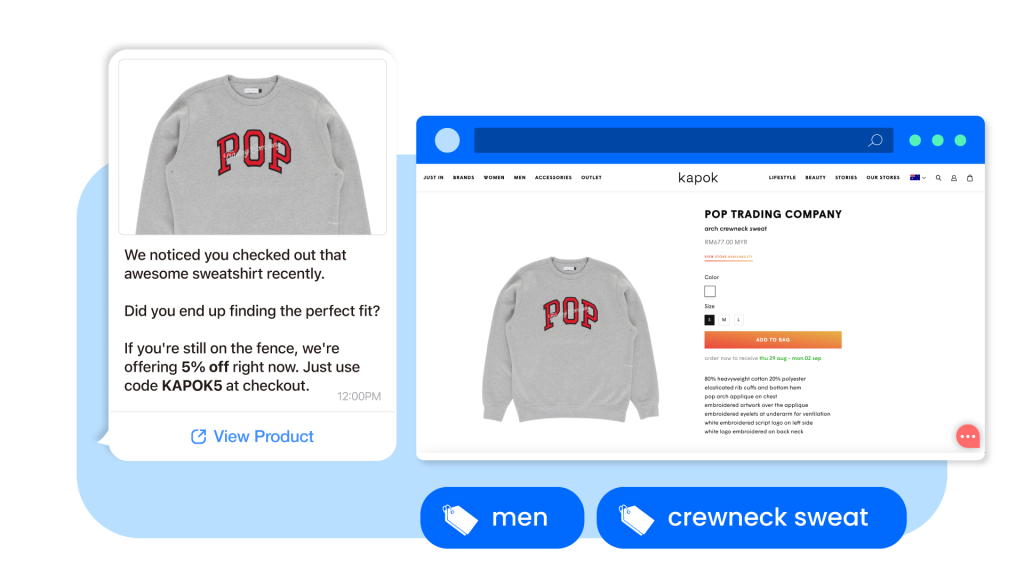
Omnichat Shopify integration empowers business to launch behavioral marketing

The Omnichat platform allows you to monitor website visitor behaviour and segment audiences based on actions taken on your store. You can define audience segments and automation criteria to deliver targeted WhatsApp marketing messages. By tagging customers according to browsing patterns, you can send more relevant WhatsApp messages that are more likely to convert. You can also use message templates to automate and personalise WhatsApp notifications for Shopify customers. WhatsApp marketing supports personalised updates, promotional offers, and loyalty programme messages delivered directly to customers, and it can be more cost-effective than some traditional channels. This approach helps ensure your messages reach the right people at the right time, improving conversion performance.
This can be done by analysing:

  • Visiting product pages
  • Time spend on each page
  • Frequency of visiting

3. Abandoned Cart Remarketing

WhatsApp Shopify integration for abandoned cart recovery automation

Cart abandonment is a common challenge in e-commerce, with many shoppers leaving before completing payment. With Omnichat’s Abandoned Cart Remarketing feature, you can proactively engage these customers and encourage them to complete their orders.

WhatsApp notifications can be triggered from Shopify events such as paid orders, abandoned carts, and new customer accounts. These messages can include key details like order confirmation, order status, shipping updates, order ID, and COD order confirmation, depending on your setup. By sending timely, personalised reminders with a direct link back to checkout, you can improve cart recovery and drive additional revenue.
To maximise results, customise your reminder messages with relevant product details and schedule them at sensible intervals, such as one hour after the cart is abandoned. This targeted approach can help recover lost sales while improving the customer experience.

4. Customer 360 View

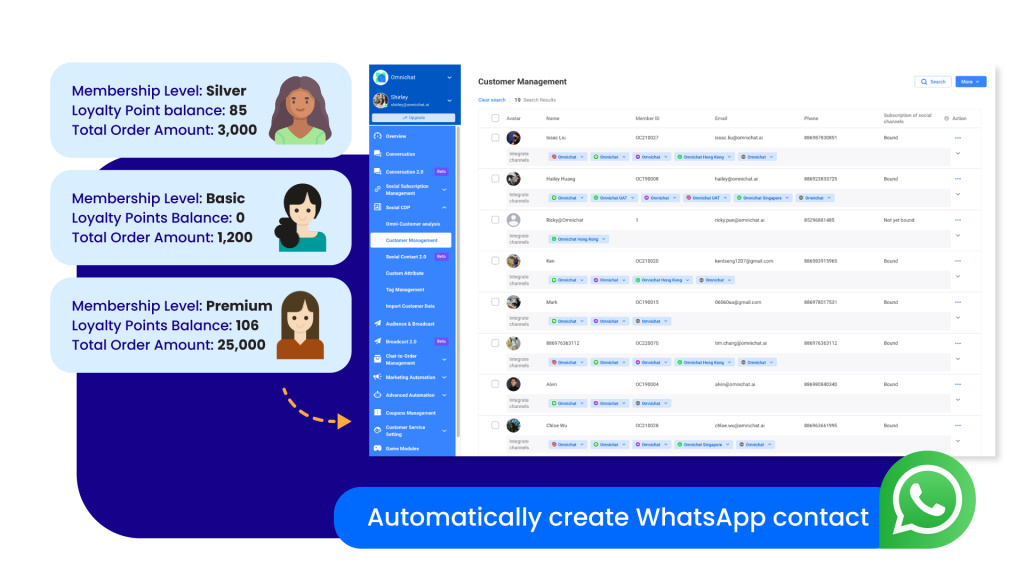
Omnichat Shopify integration customer 360 view and synced data

This integration can sync customer lists and order data from Shopify, giving your customer service and marketing teams better visibility into each customer’s activity. Depending on your integration and tracking setup, Shopify WhatsApp integrations can also help attribute WhatsApp-driven revenue in analytics dashboards. Businesses can use WhatsApp to collect post-purchase feedback, request reviews, and send reorder reminders. Order details can also be included in WhatsApp notifications to keep customers informed about their purchases.

By accessing customer information directly within the Omnichat platform, you can build a complete view of each customer and provide more personalised, efficient support. When you syncing customer data, you can view fields such as:

  • Customer name
  • Member ID
  • Email
  • Phone
  • Tag
  • Notes
  • # of accumulated orders
  • # of accumulated spending
  • Consent of email & SMS marketing

The synced data can also be used for targeted marketing. You can segment audiences by criteria such as purchase history or demographics to deliver relevant messages that boost engagement and conversions. Omnichat can also create WhatsApp contact profiles in the platform based on synced customer data, expanding your remarketing pool and helping you re-engage customers through WhatsApp.

5. Fostering Brand Loyalty

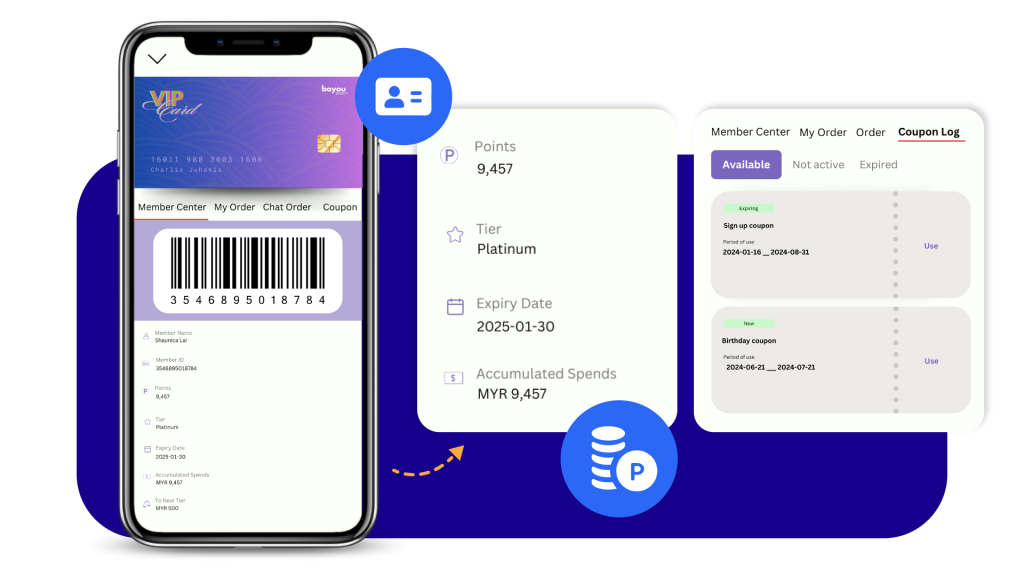
WhatsApp Business Shopify loyalty programme and membership features

Omnichat’s WhatsApp Membership Cards offer a convenient and engaging way to provide a comprehensive membership experience directly within your customers’ favourite messaging channel. By embedding your membership system into WhatsApp, you can eliminate the need for customers to download additional apps, streamlining their interaction with your brand. This seamless integration allows members to access benefits, view their loyalty points, collect coupons, and participate in exclusive promotions, all from their mobile devices.

When Integrating Shopify with Omnichat via the WhatsApp Business API, businesses can also run WhatsApp campaigns that support loyalty, repeat purchases, and personalised engagement at scale.
On top of these benefits, unlike basic WhatsApp chat tools, Omnichat can help you increase engagement and gain more value from conversation commerce by making your customer communication more interactive through features such as:

  • Interactive Games on WhatsApp can be a fun and engaging way to interact with customers and promote products or services. Businesses can create interactive games that encourage customer participation and generate excitement. By using interactive games, businesses can increase brand awareness, collect customer data, and drive sales.
  • Coupon Management allows businesses to create, distribute, and track coupons or promotional codes directly through WhatsApp. This can be done through automated messages, personalized offers, or by sharing coupon codes within the WhatsApp Catalog. By offering coupons, businesses can incentivize purchases, attract new customers, and increase customer loyalty.
  • WhatsApp Flows enables businesses to create in-app forms, guiding customers through different interactions and providing personalized support. These flows can be used for various purposes, such as collecting customer information, providing quotations, table or appointment booking or it can also serve as your after sales survey. By automating these processes, businesses can save time, improve efficiency, and provide consistent customer experiences.
  • WhatsApp Catalog & Payment allows businesses to showcase their products or services directly within the WhatsApp chat interface. Customers can easily browse through the catalog, view product details, and make purchases without leaving the app. This streamlines the shopping experience and increases the likelihood of conversions.
  • Loyalty Programs on WhatsApp provide a convenient way for businesses to reward their customers for repeat purchases or engagement. By offering loyalty points, exclusive discounts, or other benefits, businesses can encourage customer loyalty and increase customer lifetime value. WhatsApp can be used to communicate loyalty program updates, track points, and redeem rewards, making it a seamless and engaging experience for customers.

Conclusion

WhatsApp Shopify integration works best when it is connected to your store data and customer journey, not treated as a standalone chat widget. By integrating Omnichat with Shopify, you can centralise WhatsApp chat for Shopify, social messaging, and website conversations in one inbox, automate key moments like abandoned cart recovery and order updates, and route conversations to the right team with full customer context. The result is faster support, higher engagement, and a more measurable path to sales and loyalty through WhatsApp Business.

If you want to build a scalable WhatsApp commerce workflow for your Shopify store, fill in the form below and our team will recommend the right setup for your goals.

Omnichat turns WhatsApp Shopify integration into a scalable sales and support channel by centralising conversations, syncing Shopify data, and automating high-intent moments like cart recovery and order updates.