WhatsApp Flows is a feature on the WhatsApp Business Platform (API) that allows businesses to create structured, in-chat customer journeys such as appointment booking, form submission, and lead capture directly within WhatsApp. Unlike traditional chatbots, WhatsApp Flows enables customers to complete multi-step actions without leaving the chat, helping reduce drop-off and improve conversion rates.
As an official WhatsApp Business Solution Provider, Omnichat enables businesses to apply for the WhatsApp Business API, implement WhatsApp Flows, and manage customer journeys, automation, and performance tracking from a single platform.
Creating a smooth, end-to-end customer experience within WhatsApp has become an increasingly important focus for businesses. With the introduction of Meta’s WhatsApp Flows on the WhatsApp Business Platform, businesses can now design, build, and tailor customer journeys without coding, delivering seamless experiences directly inside WhatsApp.
Creating a smooth, end-to-end customer experience within WhatsApp has become an increasingly important focus for businesses. With the introduction of Meta’s WhatsApp Flows on the WhatsApp Business Platform, businesses can now design, build, and tailor customer journeys without coding, delivering seamless experiences directly inside WhatsApp.
Meta provides the WhatsApp Business Platform and Flow Builder, and a proper setup, including an approved WhatsApp Business account, is required to access WhatsApp Flows. Explicit user opt-in is also required before initiating a WhatsApp Flow.
With Omnichat and WhatsApp Flows, the future of customer engagement becomes simpler, more interactive, and more results-driven. Businesses can explore the flexibility of WhatsApp Flows to innovate customer journeys, improve operational efficiency, and drive sustainable growth.
What is WhatsApp Flows?
WhatsApp Flows supports structured UI components such as forms, buttons, and input fields, making it suitable for transactional and data collection use cases on WhatsApp.
WhatsApp Flows is built around a visual flow builder that allows businesses to create and manage automated customer interaction workflows directly within WhatsApp chat. Using screens and structured data inputs, businesses can design automated in-chat customer journeys that support a wide range of commercial activities. This approach helps streamline operations, improve efficiency, and drive higher conversion and engagement rates.
Powered by WhatsApp Flows, businesses can create app-like, multi-step conversations directly within WhatsApp chat using elements such as buttons, lists, and carousels to enhance interaction. Customers can book appointments, submit forms, register for events and promotions, and provide feedback without leaving WhatsApp. Before starting a flow, users should be clearly informed of its purpose and expected time commitment, and a clear “Talk to a human” option should be available within or after the flow to support more complex enquiries. This eliminates the need for customers to download additional apps or switch platforms, resulting in a more convenient and seamless experience.
WhatsApp Flows also delivers significant value for businesses through its one-stop, in-chat capabilities. By supporting structured data collection and guiding customers through personalised experiences, WhatsApp Flows helps reduce drop-off by keeping users engaged within the conversation. Well-designed flows can lower funnel abandonment, increase engagement rates, and improve overall customer satisfaction. In practice, effective WhatsApp Flows should remain concise, allowing most users to complete tasks in under five minutes.
Use Cases of WhatsApp Flows
- Appointment booking to drive booking rates
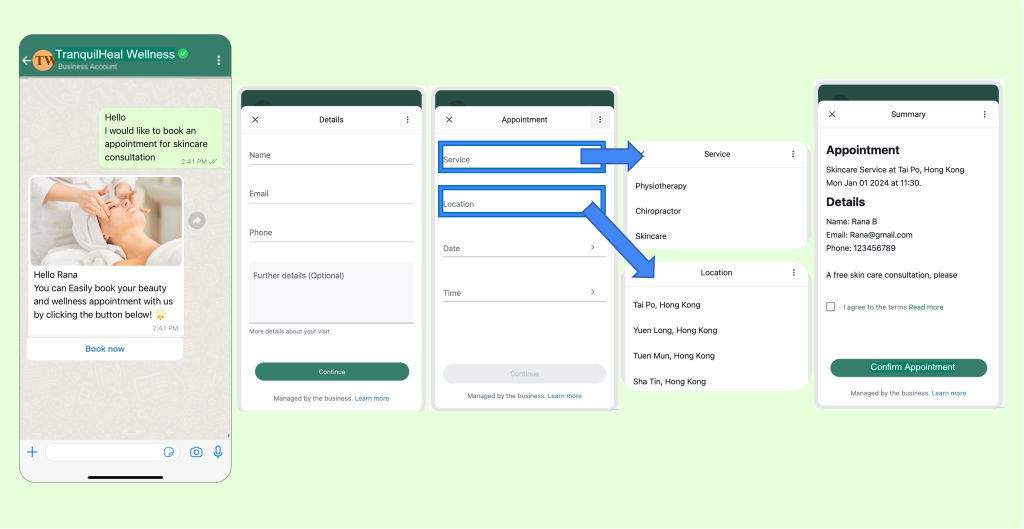
When designing customer journeys, convenience is a critical factor. WhatsApp Flows supports appointment booking by integrating backend logic such as real-time availability checks, and by using built-in UI components like date pickers to collect date-specific and additional customer information.
This allows businesses to simplify reservations, service bookings, and consultation scheduling directly within WhatsApp, without redirecting users to external pages. Through Omnichat, businesses can automatically send confirmations and relevant follow-up information once a booking is completed, ensuring a smooth and reliable experience for customers while driving higher booking rates.
In practice, WhatsApp Flows can serve as an alternative to static websites for appointment booking, lead generation, and customer interactions. By keeping the entire booking journey inside WhatsApp chat, businesses reduce friction, minimise drop-off, and deliver a more seamless end-to-end user experience.
2. Event registration to increase sign-up rate
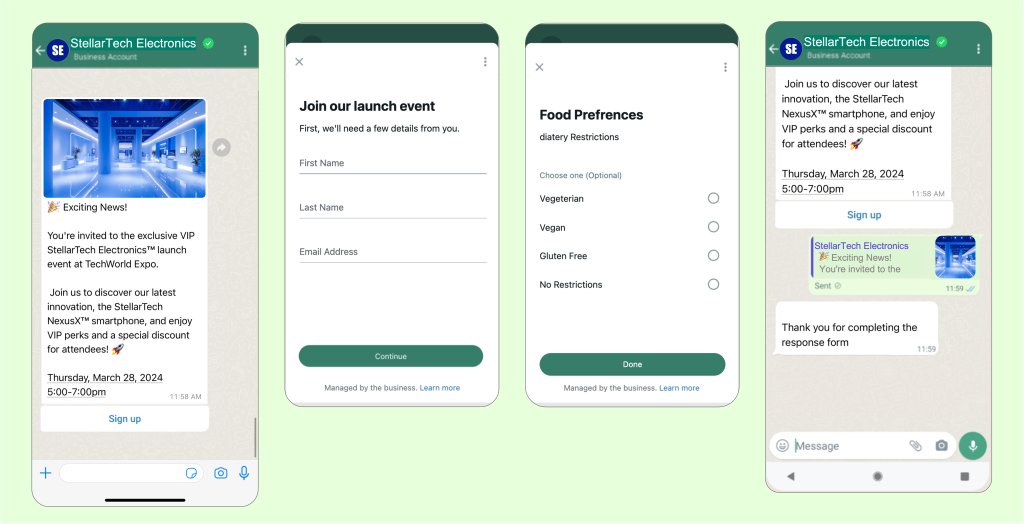
By seamlessly integrating registration and sign-up forms into WhatsApp interactions, businesses can broadcast invitation messages to specific target audiences and prompt them to complete the registration process within the app. WhatsApp Flows can be used for lead generation and generating leads by guiding customers through structured questions to collect their information, which is a common use case across industries. This simplified and user-friendly flow enhances event registration rates and expands a business’s customer base.
3. Provide special offers and rewards to capture leads
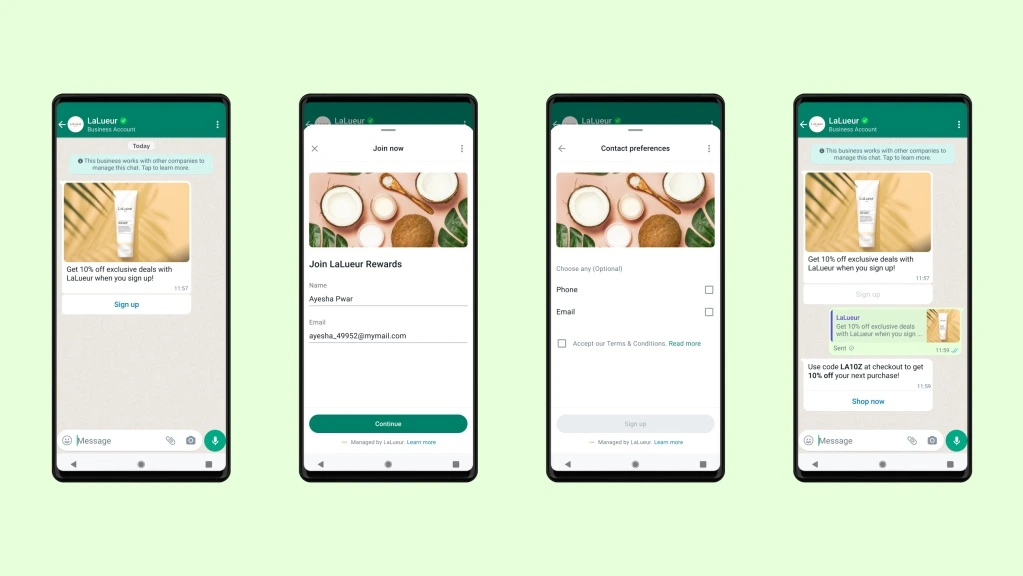
Offering discounts is an effective strategy to boost conversions. Businesses can encourage customers to click the “Sign Up” button and provide their contact information to receive exclusive rewards on WhatsApp. WhatsApp Flows can be used for marketing, brand engagement, and subscription renewals by sending business messages and reminders to customers, helping to drive conversions and improve customer retention. This approach not only drives immediate conversions but also enables businesses to acquire new leads for remarketing and sales purposes.
4. Collect customer feedback to improve service
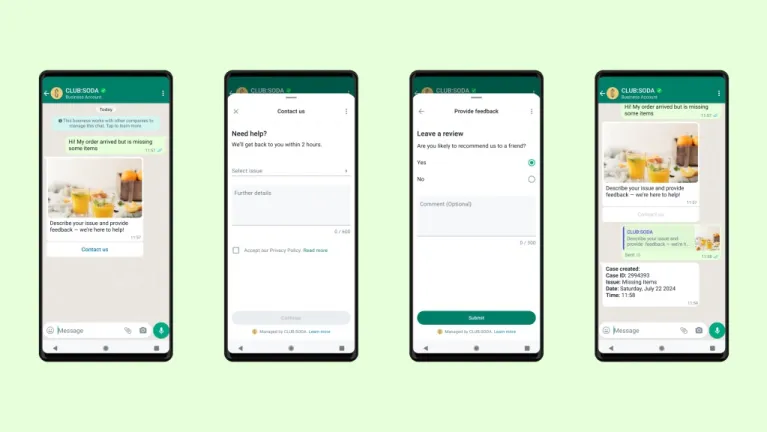
Customer loyalty has emerged as a key focus for marketers. Utilising WhatsApp, the world’s most popular messaging platform, to gather customer feedback offers a more convenient way to understand customer opinions and ultimately enhance customer satisfaction. WhatsApp Flows can be used to conduct surveys and collect customer feedback directly within the chat, improving both data collection efficiency and response rates.
Additionally, WhatsApp Flows can be tailored to specific needs, such as providing insurance quotes by guiding customers through personalised, structured flows to gather information and deliver quotes efficiently. Surveys, data collection, and other use cases can be managed effectively within WhatsApp Flows, helping businesses address a wide range of operational and customer engagement requirements.
Performance Analysis and Segmentation for WhatsApp Flows
Omnichat understands the importance of data tracking and analysis in today’s data-driven era, so we extend our comprehensive performance tracking capabilities to WhatsApp Flows. By integrating WhatsApp Flows with existing systems such as CRMs, businesses can enable real-time data exchange, data synchronisation, and improved operational efficiency. The Flows API also allows for programmatic management of flows, making it easier to handle multiple flows or integrate flow creation into development pipelines.
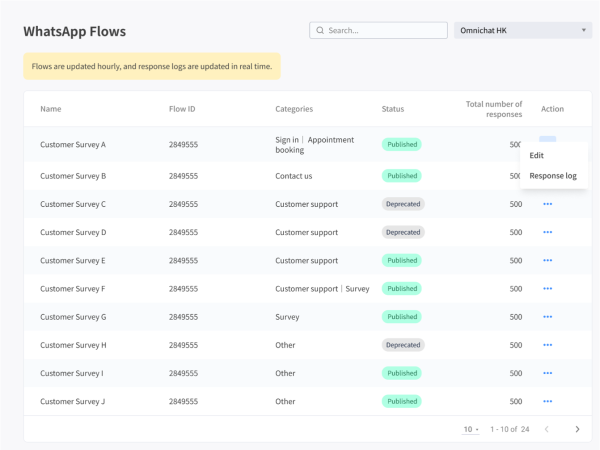
OvOverall flow information, status, number of responses can be monitored and analysed on Omnichat. Key flow metrics, including changes in flow status, error rates, and endpoint performance, can be tracked using webhooks. Measuring the impact of WhatsApp Flows helps businesses drive growth and achieve higher conversion rates, as insights from performance analysis can be used to optimise each step of the customer journey. With these insights, businesses can make informed decisions, fine-tune their strategies, and achieve better results from their WhatsApp Flows campaigns.
Customer segmentation can also be carried out through Omnichat. By assigning specific tags to customers who have completed forms, businesses can categorise and segment interested users for remarketing purposes. This enables more targeted follow-up with personalised offers and rewards, helping to maximise ROI and strengthen customer loyalty. Best practices for WhatsApp Flows include limiting each screen to a single task, using personalisation where appropriate, obtaining proper user opt-ins, and prioritising performance by using data-channel-less initial screens.
Success Story: Lenovo’s WhatsApp Appointment Booking
Global technology leader Lenovo successfully employed WhatsApp Flows to streamline its technical service appointment booking process, enabling customers to manage their schedules directly within the app.
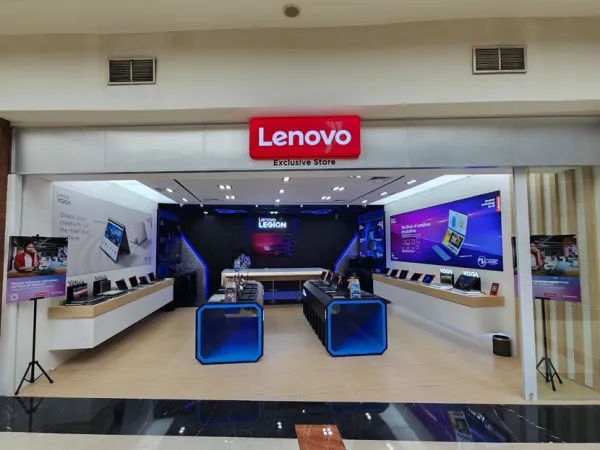
By eliminating the need for external links and additional steps, customers were able to navigate the entire booking journey seamlessly. From being greeted by a chatbot menu to selecting a preferred time slot and receiving confirmation on WhatsApp, the overall process became simple and hassle-free.
The implementation of WhatsApp Flows delivered significant results for the company. WhatsApp Flows enables brands to provide a personalized experience, leading to higher conversion rates and stronger customer engagement. By boosting booking rates, enhancing engagement, and improving overall customer satisfaction, Lenovo achieved an 8.2 times increase in booking conversion rates, along with a 44.5% increase in customer engagement on WhatsApp. This demonstrates the effectiveness of WhatsApp Flows in driving measurable business outcomes.
Businesses using WhatsApp also report higher open rates and faster response times compared to traditional communication methods. This WhatsApp Flows use case highlights how enterprises can replace external booking pages with fully in-chat customer journeys on WhatsApp.
How to get started?
Before using WhatsApp Flows, it is important to note that this feature is exclusively available on the WhatsApp Business Platform (API) and is not supported on the standard WhatsApp Business App. To access and fully utilise WhatsApp Flows, businesses must apply for and operate under an approved WhatsApp Business API account.As an official WhatsApp Business Solution Provider, Omnichat supports businesses throughout this process, from Business API application and account setup to implementing WhatsApp Flows and managing customer journeys at scale. Through Omnichat, businesses can unlock the full capabilities of WhatsApp Flows and deliver structured, in-chat experiences that elevate customer interactions and drive measurable business outcomes.
Book a Consultation