AI chatbots have become quite popular, with major tech companies developing their own generative AI. Microsoft Copilot is now available on WhatsApp for free, without needing to download an app or use a VPN. Its functions, including composing messages, answering questions, generating images, and translating, help users enhance their daily communication and work efficiency. This article will provide a detailed introduction to Microsoft Copilot on WhatsApp and how to apply its features practically.
November 17 Update: Meta previously announced that, starting January 15, 2026, it will prohibit the use of general-purpose AI chatbots on the WhatsApp platform, which will affect WhatsApp AI assistants, including Microsoft Copilot. However, it was recently discovered that Microsoft Copilot and Perplexity accounts registered with Hong Kong phone numbers are no longer responding to queries. If you wish to use AI functionalities on WhatsApp, you can still leverage Omnichat’s integration with the WhatsApp Business API to achieve WhatsApp automation marketing. This allows a 24/7 Chatbot to interact with customers and answer questions, enables multiple teams to manage the account simultaneously, and even allows for the integration of messages from other channels.
How to Use Microsoft Copilot on WhatsApp?
To use Copilot on WhatsApp, you can follow these three methods:
Method 1: Click the Microsoft Copilot on WhatsApp link, then press “Continue to Chat” to start a direct conversation with Copilot.
Method 2: Scan the QR Code below with your phone, which will redirect you to the Microsoft Copilot WhatsApp chat window.
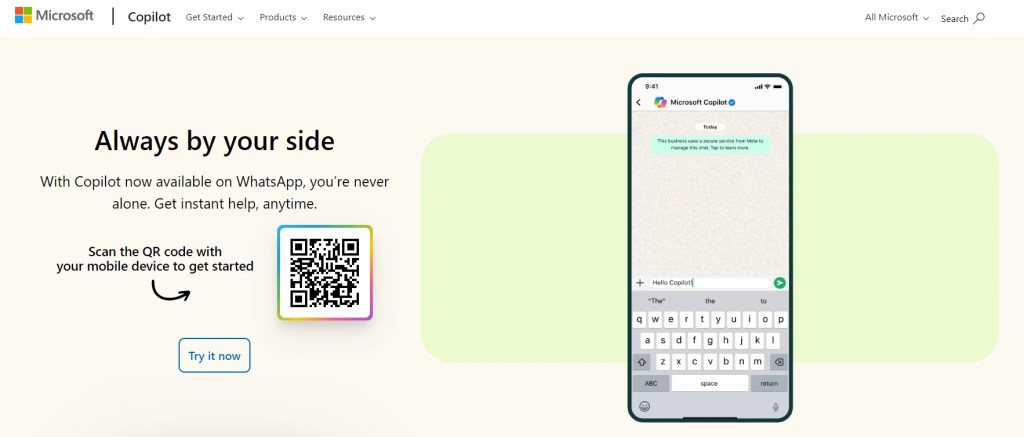
圖片來源:Microsoft
Method 3: In WhatsApp, tap the “+” icon in the top right, enter Microsoft Copilot’s phone number “+1 877-224-1042” in the search bar, then tap “Chat” to begin a direct conversation without adding it as a contact.
The first time you use Microsoft Copilot, you will be asked to accept the terms of use and privacy statement before starting.
Introduction to Microsoft Copilot on WhatsApp
Generate Text
You can ask Microsoft Copilot to assist with text-based tasks such as generating articles, composing messages, clarifying discussion points, and translating foreign languages. Copilot supports over 40 languages for text-based prompts and responses, including Traditional Chinese, Simplified Chinese, English, French, and Spanish, etc.
Answer Questions
You can ask multiple questions in the Microsoft Copilot WhatsApp chat window, and Copilot will provide you with answers.
Generate Images
Copilot can generate images using Image Creator. Simply describe the image you want in WhatsApp, and Copilot will generate it. This is suitable for both personal use and creating posters, logos, or social media post images for company marketing purposes.
Upload Images for Copilot to Analyse
Copilot can also provide information for photos you take through visual search, supporting formats including PNG, JPEG, PJP, and JFIF. Upload a photo you’ve taken to WhatsApp, then ask Copilot a question, and it will search the web to help you identify the content of the photo.
Upload Files for Copilot to Extract Information
Users can upload files directly into the WhatsApp chat conversation, and Microsoft Copilot can analyse and extract information from these files to provide relevant insights, answer questions, or assist with specific tasks. Copilot supports the following file formats, including PDF, DOCX, XLSX, PPTX, TXT, TEXT, JSON, CSV, and MD. The file size limit is 50MB, and files will be automatically deleted after 30 days.
Send Voice Messages to Get Answers
Users can send a voice message in WhatsApp, and Microsoft Copilot will provide a detailed response in text. Copilot Voice supports over 60 spoken languages, including Mandarin, English, French, and Japanese, but does not include Cantonese.
Business Applications of WhatsApp Copilot Features
Writing Social Media Ads
When Marketing teams need to write multiple versions of ad copy for their company’s Instagram and Facebook ads, and translate them into English and French to reach overseas markets, they can directly describe the product features and target audience to Copilot on WhatsApp to quickly obtain high-quality, multilingual copy drafts.
Inquiring About Industry Pain Points and Needs
Sales teams can save time and propose more targeted solutions by asking Copilot to provide refined insights into an industry’s challenges and consumer expectations before meeting with a prospect, such as “Please provide the main challenges currently faced by the beauty industry in Hong Kong, as well as consumer demand for purchasing treatments.”

Generating Social Media Post Images
Marketing teams can quickly generate multiple visual design drafts for social media promotions by simply describing the image they want to Copilot, such as “Please generate a colorful, summery Instagram post image that includes the words ‘Summer Sale’ and ‘Up to 90% Off’.”

Quickly Extracting Report Highlights
Managers can save time and quickly get a refined summary of a lengthy market research report by uploading the document to Copilot on WhatsApp and asking it to extract the core findings and recommendations.
Deleting WhatsApp Copilot Chat History
Many users are concerned about conversation privacy. Although Copilot cannot access your contacts, chat content, or any private information in your account, if you want to delete your chat history with Copilot, simply send the message “/help” and select “Delete chat history.”
Unlock More WhatsApp AI Features with Omnichat
WhatsApp Copilot offers users the convenience of accessing information anytime, anywhere, solidifying WhatsApp’s role as a top AI assistant. However, for businesses looking to perform more complex AI operations, integrating the WhatsApp Business API through Omnichat is the optimal solution. This unlocks an omnichannel AI conversational experience by leveraging Omnichat’s Omni AI Agent Studio.
- AI Customer Service Agent: Provides 24/7 precise responses to customer inquiries from all channels and delivers personalised solutions.
- AI Shopping Agent: Effectively boosts conversions on customers’ preferred messaging platforms by providing tailored product recommendations and streamlining the sales process.
- AI Marketing Campaign Agent: Easily generates marketing strategies, defines target audiences, and crafts engaging content through AI automation.
Omni AI Agent Studio combines the strengths of Omnichat’s native AI with the power of large language models (LLMs) from OpenAI, Google, Meta, Anthropic, Deepseek and AWS, etc. These agents can be seamlessly integrated into any conversational workflow, ensuring businesses can automate customer service, sales, and marketing across WhatsApp, Facebook Messenger, Instagram, LINE and more, thereby enhancing operational efficiency and customer experience.
Book a Consultation