Omnichat integrates with HubSpot to sync LINE and WhatsApp conversations and contact data, automatically assign Contact Owners, and trigger automation workflows—enhancing sales and customer service efficiency.
For many businesses, HubSpot is the core tool for contact management and sales automation, but real customer interactions often take place on messaging platforms like LINE and WhatsApp. When service agents need to constantly switch between platforms and the CRM system to access customer information and conversation history, it not only reduces response efficiency but also increases the risk of missing important data.
With Omnichat integrated with HubSpot CRM, customer details such as name, email, custom fields, and deal stage are instantly displayed whenever a message is received from any social channel—eliminating manual lookups and streamlining workflows.
In addition, when HubSpot contact data is updated, it can automatically trigger personalized LINE or WhatsApp messages and launch automation workflows—achieving seamless social messaging sync and full CRM automation integration.
Can’t Sync Line and WhatsApp Chats with Hubspot CRM? Use Omnichat to Unify Customer Data and Conversations.
For many businesses, HubSpot is the go-to system for managing contacts, but real conversations often take place on social platforms like LINE and WhatsApp. When agents have to manually switch screens to look up information and compare customer records, it slows down response time and increases the chance of missing important data.
With Omnichat integrated with HubSpot CRM, messages from any social platform display the contact’s name, email, custom fields, and deal stage instantly—no more manual searching, no risk of losing conversation context.
Moreover, when HubSpot contact data changes, it can automatically trigger personalized messages via LINE or WhatsApp and launch automation workflows, enabling true social messaging sync and CRM automation.

Automatically Assign LINE and WhatsApp Leads to the Right HubSpot Contact Owner for a Seamless Customer Experience
When customers reach out through different social messaging channels, the lack of real-time HubSpot sync can lead to duplicate replies, handling confusion, and inaccurate sales attribution.
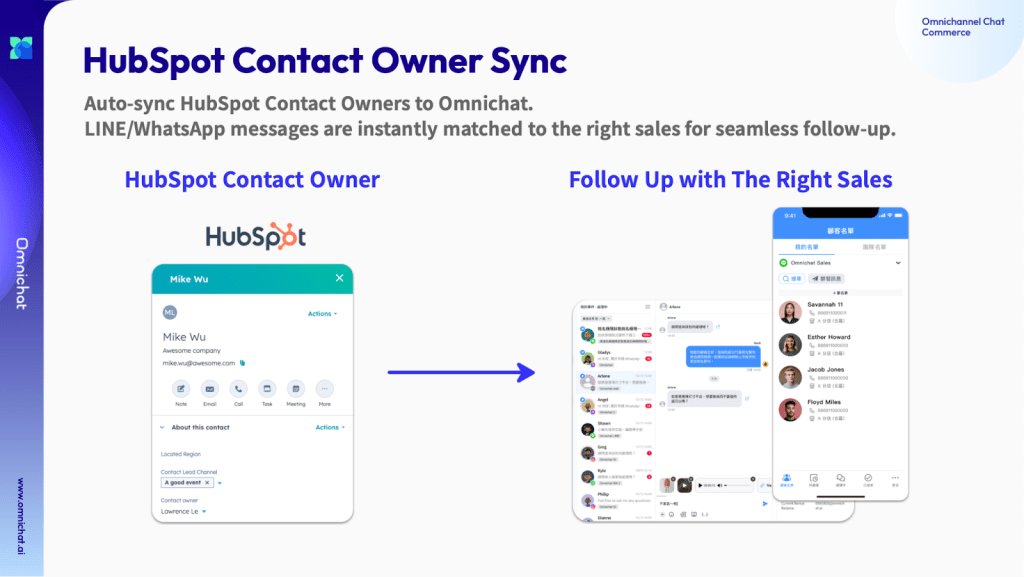
By integrating Omnichat with HubSpot Contact Owner, each contact—whether from LINE or WhatsApp—is automatically assigned to the appropriate sales. Every message is handled by a consistent point of contact, ensuring clearer communication and reducing the risk of missed follow-ups.
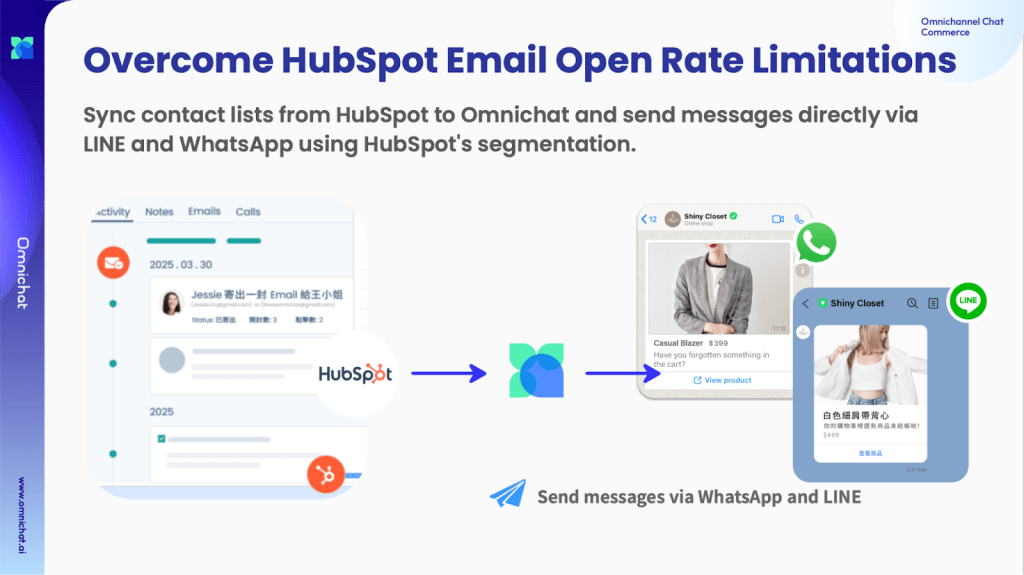
Customers Not Opening Emails? Use Cross-Channel Messaging Via LINE and WhatsApp to Boost Reach and Conversion Rates.
Even with a well-segmented contact list in HubSpot, relying solely on email can result in poor open rates and reduced conversion performance.
By integrating Omnichat with HubSpot, you can automatically sync filtered contact lists to LINE and WhatsApp, and send promotional offers, shopping reminders, or important updates. This not only increases message open and reach rates but also helps your brand maintain consistent and effective engagement.
Still Relying on Forms to Capture Leads? Turn LINE and WhatsApp Conversations into HubSpot Contacts Automatically
Lead forms often face low submission rates, creating friction in the lead generation process. With Omnichat’s integration with HubSpot, you can automatically convert every LINE or WhatsApp conversation into a HubSpot contact—with no manual data entry required.
Each new lead is tagged by source, assigned to the appropriate sales representative, and enrolled in your existing HubSpot workflows. This allows social messaging to become a reliable entry point for qualified leads, enabling real-time conversion from the first message and eliminating delays between engagement and follow-up.

Transform Customer Engagement and Sales with Omnichat × HubSpot Integration
Whether you’re dealing with scattered contact data, low email open rates, or fragmented sales workflows, Omnichat’s HubSpot integration can help. From real-time data sync to automated broadcasts and contact assignment, it empowers marketing and support teams to enhance efficiency and customer experience.
Book a Consultation