According to Statista data, Facebook is the most used social platform globally and has become a crucial channel for businesses to acquire new customers and maintain relationships. However, relying on manual replies for Facebook’s massive message volume is challenging and risks losing customers. This article introduces Facebook Messenger Auto-Reply as the essential solution. We break down the definition, benefits, setup methods, and practical success cases, showing you how to instantly convert every customer interaction into a business opportunity.
What is Facebook Auto-Reply?
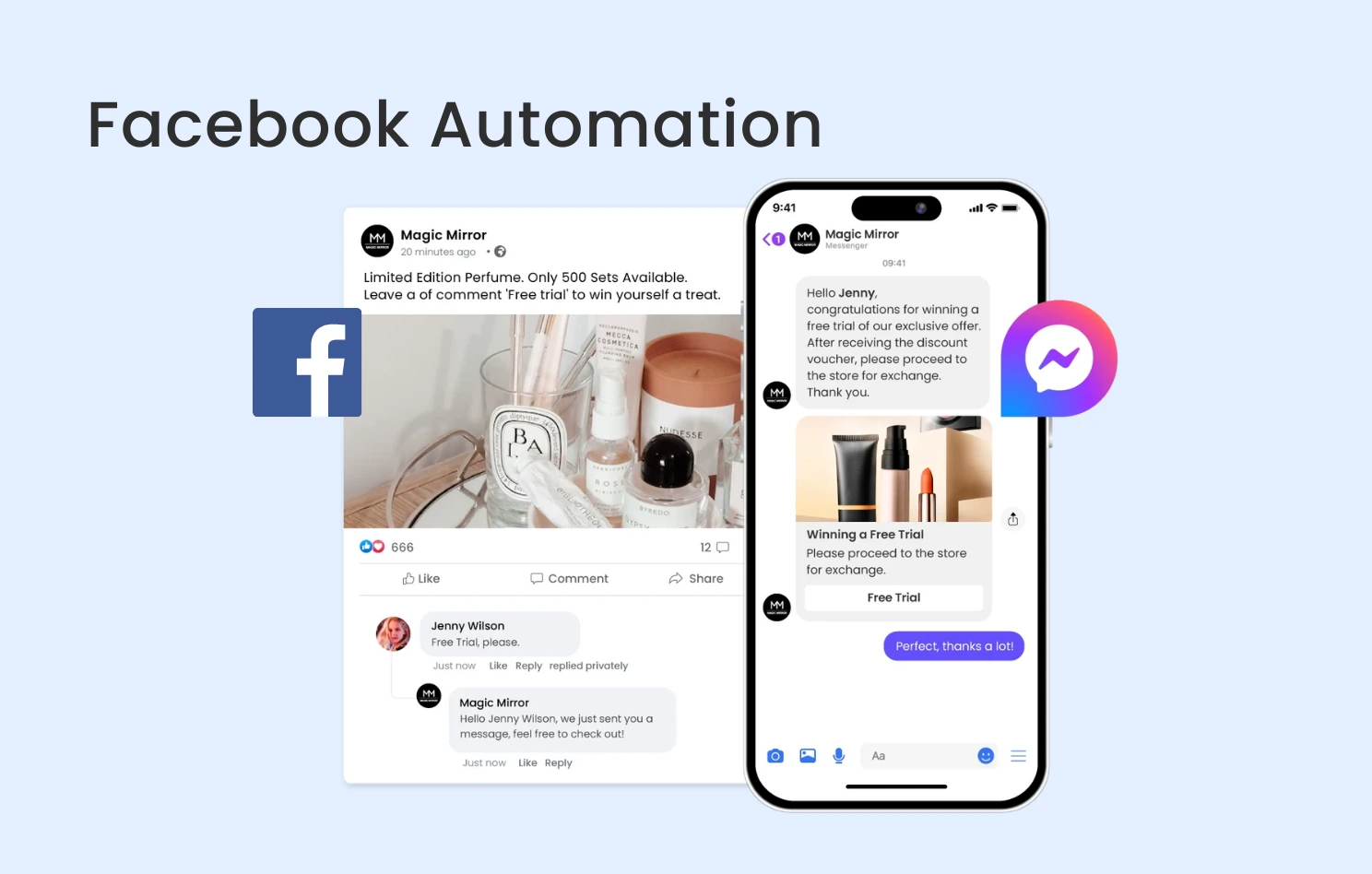
Facebook Auto-Reply is a system configuration that allows brands to automatically detect customer inquiries and post comments and respond immediately with pre-set template messages, based on defined keywords or triggers. This functionality enables brands to quickly handle a high volume of inquiries even during non-working hours or message peaks, and can deliver product links, FAQs, or contact information, ensuring every customer interaction is processed promptly.
Why Set Up Facebook Auto-Reply?
24/7 Instant Response Prevents Customer Loss
Auto-reply ensures your brand service operates 24/7 year-round. Customers receive an instant reply regardless of time zone or non-business hours, effectively preventing customer loss caused by lengthy delays. This fast response also allows the brand to obtain the “Very responsive to messages” badge, boosting brand credibility.
Accelerate Sales Processes and Boost Conversion Rates
Quick response times contribute to faster customer purchase decisions. The Chatbot can instantly guide customers through inquiries and qualify their intent, significantly accelerating the overall sales process. For example, when staff are offline, a pre-set auto-reply can provide buttons linked to a designated website, helping customers complete a purchase or make an appointment, ensuring no business opportunity is missed.
Reduce Labor Costs and Optimise Resource Allocation
Facebook Auto-Reply completely automates standardised, high-volume common inquiries, efficiently handling large volumes of customer queries. This significantly frees up the customer service team’s time and labor costs, allowing live agents to focus on more complex challenges or high-value sales consultations, thereby substantially reducing operating costs and optimising human resource allocation.
Enhance Customer Engagement and Build a Consistent Brand Image
Auto-reply facilitates immediate and personalised interaction. The Chatbot can provide personalised product recommendations and service information based on the customer’s conversation history and interests, significantly boosting customer satisfaction and engagement. Simultaneously, establishing a consistent reply tone helps unify the brand image across all social media platforms, building long-term trust and loyalty.
Facebook Messenger Auto-Reply Setup Methods
Setting Up via Meta Business Suite
This method is suitable for setting up simple welcome messages or business hours notifications in Facebook Messenger. You can log into the desktop version of Meta Business Suite, go to “Inbox,” and click “Automation” in the top right. Then, click “+ Create Automation” and select the type of auto-reply you wish to set up:
Set Up “Instant Reply”
This replies to the first message a user sends you in Messenger. You can customise the message to greet them, provide more information, or inform them of the likely response time.
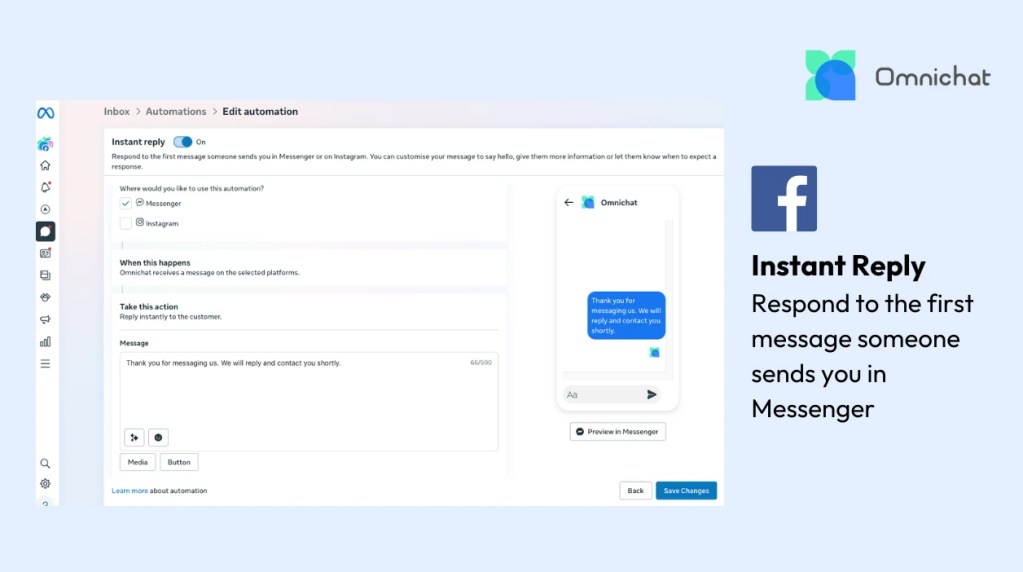
1. Click “Instant Reply,” enable the function, and select Messenger.
2. Enter your reply message, e.g., “Thank you for messaging us. We will reply and contact you shortly.”
3. You can add a button linking to a designated website, such as your online store or FAQ page.
4. Preview the message effect on the right.
5. Click “Save Changes” when finished.
Set Up “Away Message”
This sends a message when you are away in the Inbox or schedule times to be away each week in the Timing section. You can customise your message to let people know how long you’ll be away and when you’ll respond.

1. Click “Away Message” and select Messenger.
2. Select your weekly away time in the “Time” block.
3. Enter the message to be sent automatically when you are away, e.g., “Hello! Thank you for your message. We are currently outside of business hours, but we will reply to you soon!”
4. You can add a button linking to a designated website, such as your store hours or address pages.
5. Preview the message effect and click “Save Changes” when complete.
Set Up “Custom Keywords” Auto-Reply
This sends an automatic reply when the system detects messages containing specific keywords.
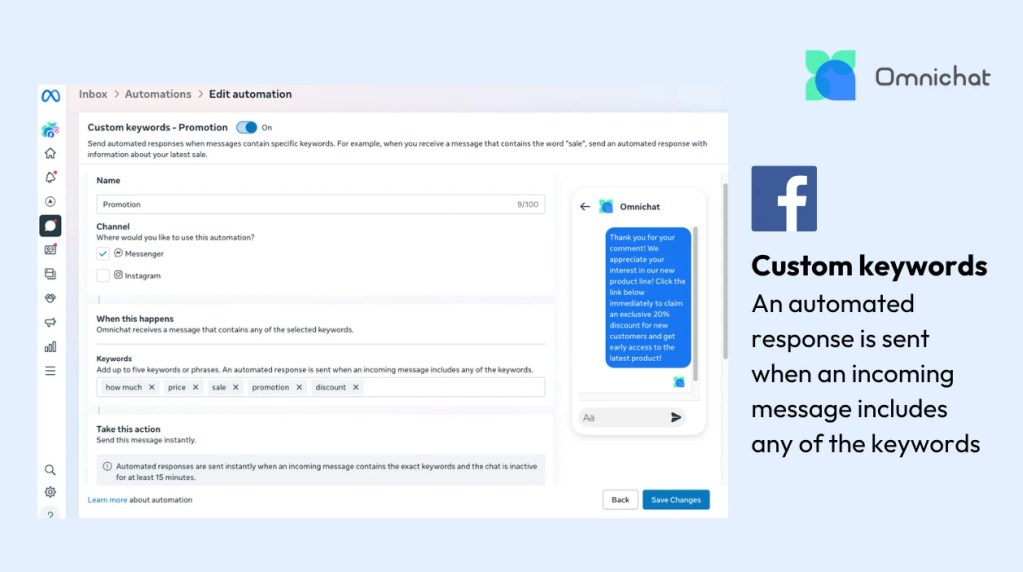
1. Click “Custom keywords,” name the reply, and select Facebook.
2. Enter a maximum of 5 keywords or phrases, e.g., “how much,” “price,” “sale,” “promotion,” “discount.”
3. Enter the automatic reply message, e.g., “Thank you for your comment! We appreciate your interest in our new product line! Click the link below immediately to claim an exclusive 20% discount for new customers and get early access to the latest product!”
4. Preview the message effect and click “Save Changes” when finished.
Setting Up Facebook Auto-Reply via Omnichat
If a business wants to automatically reply to Facebook post comments and DM customers, use a Chatbot for in-message interactions, or handle complex conversational flows involving multi-team management and cross-platform data integration, they must integrate a Messenger API Technology Provider (such as Omnichat).
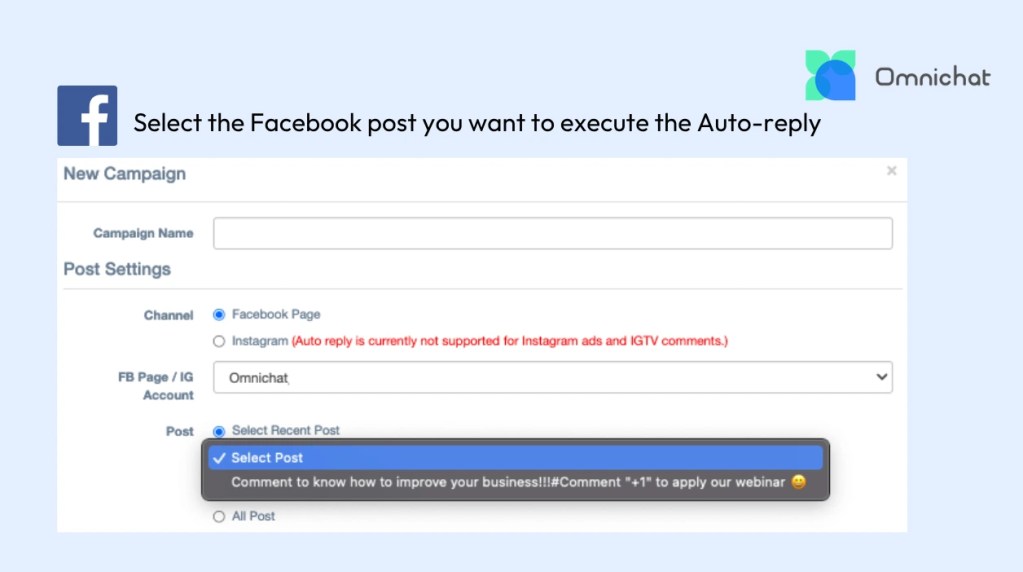
1. Go to the Omnichat backend’s “Advanced Automation Features > Facebook/Instagram Comment Reply” page.
2. Click “New Campaign” and select the Facebook Page.
3. In the “Select Recent Post”, select the “Post” you want to execute the “Auto-reply”
4. Set the effective time limit for the post reply.
5. Set up the post reply’s trigger conditions (e.g., must contain some or all keywords).
6. Create at least one “Public comment reply” or “Private Messages reply” content.
7. You can set up multiple groups of replies (the system will randomly send one of the messages, reducing the chance of the Facebook account being blocked).
8. Click “Publish” when complete.
Facebook Auto-Reply Commercial Case Studies
Many well-known brands already use auto-reply on Facebook, especially during holiday or discount seasons when they handle thousands of comments, making manual replies inefficient. Even small brands without large ad budgets can promote flash sales on Facebook by setting up keyword auto-replies to deliver coupons, boosting organic reach.
Automated Coupon Claiming via Comments
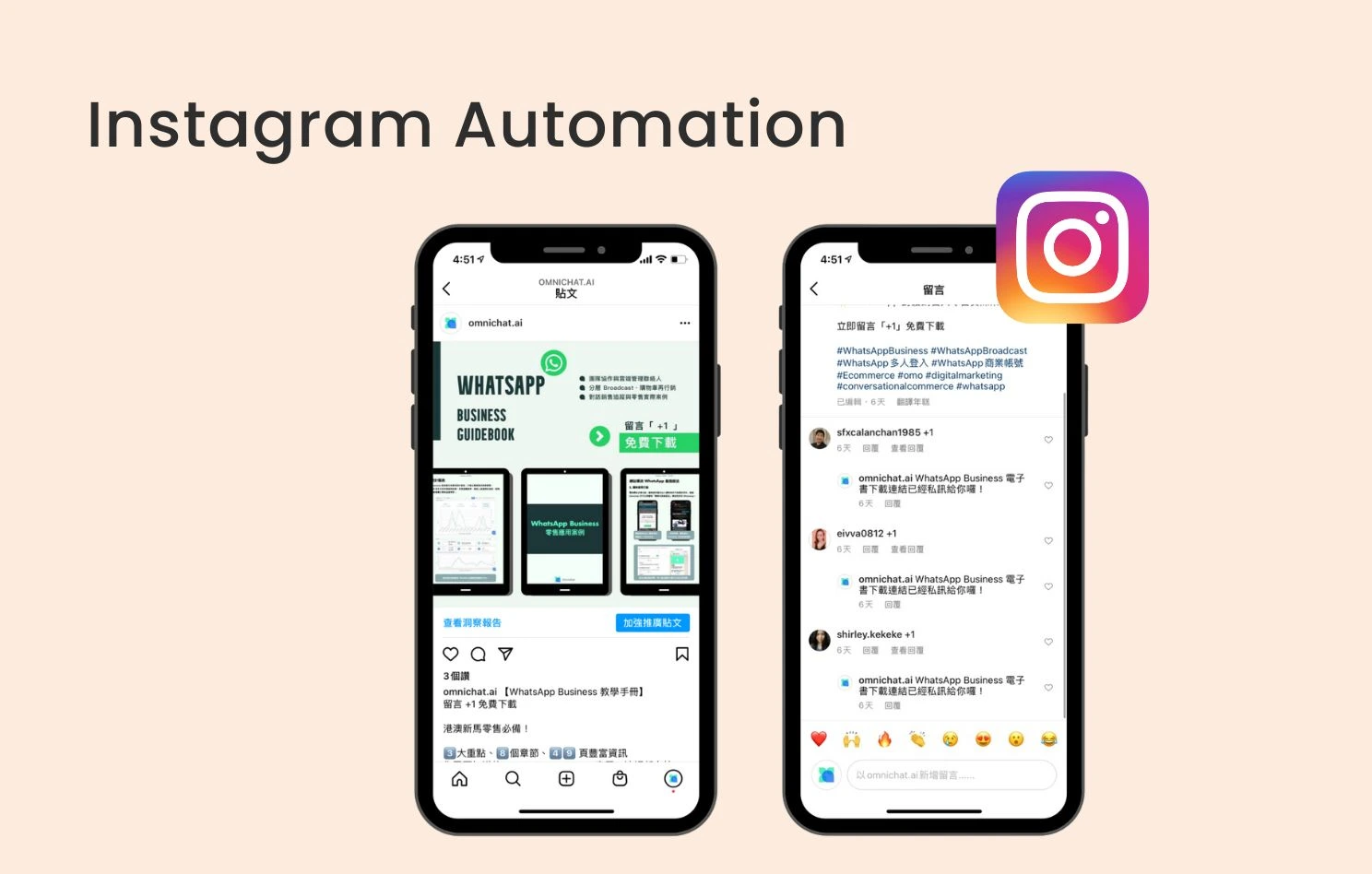
This is a low-cost, high-efficiency marketing model. Businesses can set up Facebook keyword auto-reply, using a 24/7 Chatbot to automatically distribute coupons and encourage customers to comment. As customers comment to claim the coupon, they attract friends to do the same, causing the promotional post to spread widely and increase engagement—acting as a free advertisement. All customers who comment are added to the merchant’s contact list, instantly acquiring new leads for future remarketing.
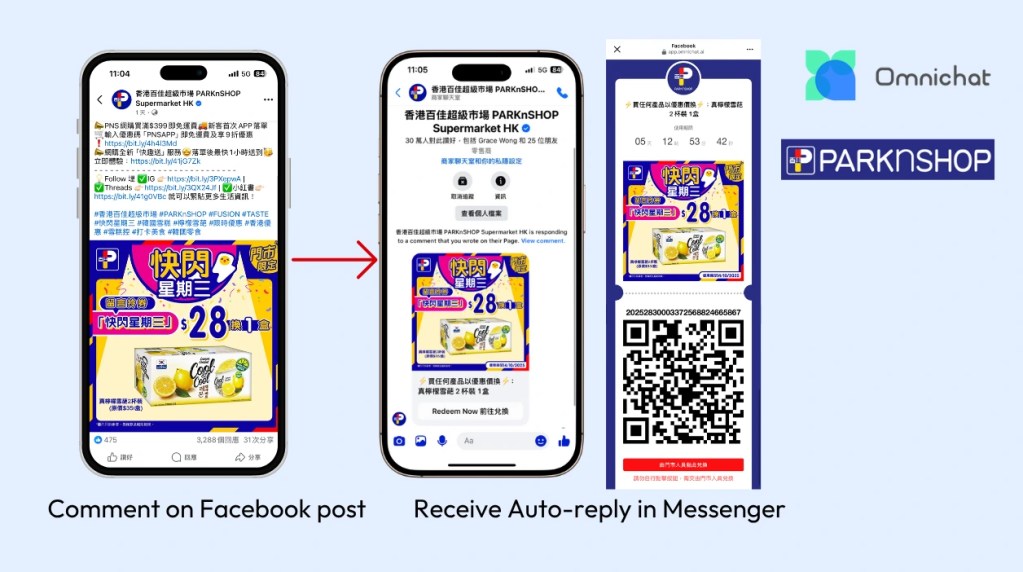
Example: ParknShop uses the Omnichat Chatbot and coupon marketing for its weekly “Flash Wednesday” promotion, distributing coupons to Page fans. Typically, thousands of coupons are redeemed within 30 minutes of the post launch, and customers can then scan a QR Code at a physical store to redeem the offer within a limited time. This successfully builds a loyal customer base that consistently monitors the Facebook page, drives online and offline traffic, and requires no additional advertising budget.
Gamification Marketing with Auto-Reply
To stand out in the competition, businesses can replace simple text messages with interactive games. When every competitor is sending text promotions, sending an interactive game naturally captures more attention. Omnichat has designed 5 interactive games, including Scratch-off Tickets, Lucky Roulette, Slot Machine, Draw Lots, and Gashapon, that can be sent via WhatsApp, Facebook, and Instagram to win customers and enhance the shopping experience.
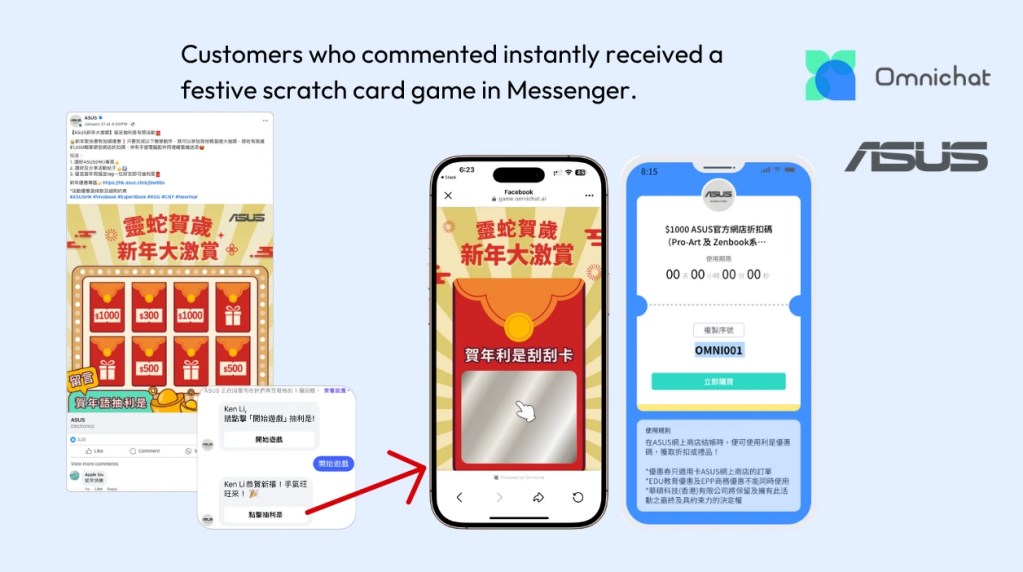
Example: ASUS launched a comment-to-win prize activity on Facebook during the New Year. Customers who commented instantly received a festive scratch card game in Messenger. After completing the game, customers won a shopping coupon or gift. Since everyone received a prize, this drove customers to the official website for purchases, significantly increasing the conversion rate.
Book a Consultation